Defense & Intelligence · Moraph software

Mission Planning Workflow

Build, review and approve mission plans, and carry the approved version where there is no network

At a glance

For
Unit and staff planners at battalion, brigade and equivalent echelons
What it does
Set up → Plan → Approve and issue → Carry and verify
Type and deployment
Moraph software, running in Moraph Apps. Printable plan package, Import at home station, Exercises, With edge infrastructure.
Availability
Generally available. What this means Release notes
Works alongside
Maps and geospatial systems, Unit and equipment data, Plan exchange formats, Moving plans between workspaces and 3 more

Request a demonstration See the walkthrough

What it does not do

  • The Suite is a planning tool. It does not compute firing solutions, control weapons or replace your organization's command and control or fire support systems.
  • It does not track forces and has no map: places and distances are what planners enter, not live feeds.
  • It has no offline application and no sync: a downloaded package is fixed at its version, and changes made elsewhere come back only as a new draft by import.

All 8 limitations

Overview

What you are buying

The Mission Planning Workflow is a web workspace in Moraph Apps for unclassified administrative planning. Staff build plans from phases, checklist items, resources and movement legs, with march tables and sustainment estimates calculated from the planning factors you set; reviewers answer by area, and a designated approver approves a version, which is then locked. The approved plan downloads as a JSON file and a printable HTML file with a SHA-256 fingerprint, to print or carry on approved media where there is no network. It has no map engine, no offline application and no sync.

The problem it solves

Mission plans are often split across slide decks, spreadsheets and email, each holding a different version. Reviews arrive by email and are hard to tie to the version they commented on, it is unclear which version the approver signed off, and when a copy is taken somewhere without a network, nobody can show later that it was the approved one or who received it.

  • Copies taken where there is no network can't be checked against the approved version
  • Plans are split across paper, slides and spreadsheets in different versions
  • Reviews and approvals are tracked by email against changing drafts
  • There is no reliable record of who changed the plan, or when
Who uses it and related requirements

Who uses it

  • Unit and staff planners at battalion, brigade and equivalent echelons
  • Commanders who review and approve plans
  • Logistics and sustainment planners supporting deployed units
  • Expeditionary and disaster-response teams who carry approved plans to places without a network
  • Training and exercise staff who plan and review exercises

Related requirements

Listing a requirement here is not a statement that the product meets it; meeting it remains your organization's responsibility.

See how it works

A short walkthrough

Illustrative screens with fictional sample data. They show the workflow, not any client’s data or configuration, and the layout of the product itself differs. A live demonstration uses the product with sample data.

  1. Step 1

    Mission plans

    Planners start from the list of plans, with each plan's version, stage and readiness for approval.

    PlanVersionOwnerStageReadiness
    Exercise Example North: movementv4Operations plannerApprovedAll checks met
    Exercise Example North: resupplyv3Logistics plannerIn planning2 of 3 phases ready
    Exercise Example North: COA 2v2Operations plannerIn review1 review open
    Example route reconnaissancev1Operations plannerDraftNo phases yet
    Planners start from the list of plans, with each plan's version, stage and readiness for approval.
  2. Step 2

    The plan record

    Each plan shows its approved version, phases, movement legs, sustainment and readiness.

    Exercise Example North (fictional) · Movement plan v4

    Approved by
    Commander
    Phases
    4, all Ready
    Movement legs
    Serials 1 to 4, Example Blue and Example Gold
    Location
    Example training area (described, no map)
    Sustainment
    Water short by 1 day (sample)

    Records

    • Phases and transition criteria
    • Movement legs and march table
    • Checklist items
    • Resources and reviews
    Each plan shows its approved version, phases, movement legs, sustainment and readiness.
  3. Step 3

    The movement table

    Movement timings are calculated from the distances planners enter and the planning factors your unit sets.

    SerialUnitRouteFromToDistance
    1Example Unit ARoute Example BlueCheckpoint 1Checkpoint 642 km
    2Example Unit BRoute Example BlueCheckpoint 1Checkpoint 642 km
    3Example Unit CRoute Example GoldCheckpoint 2Checkpoint 957 km
    4Example Support UnitRoute Example GoldCheckpoint 2Checkpoint 957 km
    Movement timings are calculated from the distances planners enter and the planning factors your unit sets.
  4. Step 4

    Sustainment

    Supply needs are estimated from the plan's personnel and days and the factors in Planning settings, against the plan's resources.

    Example Unit C · Resupply plan v3

    Personnel
    120 (sample)
    Planning period
    3 days (sample)
    Rations estimate
    People × days × the factor you set
    Water estimate
    People × days × litres per person per day
    Status
    Changed since approval

    Changes since the previous version

    • Water resource quantity raised
    • Movement leg for serial 4 departs later
    • Comment added for commander's review
    Supply needs are estimated from the plan's personnel and days and the factors in Planning settings, against the plan's resources.
  5. Step 5

    Carrying the approved plan

    The approved package is downloaded, issued and later checked, and each step is recorded in the plan history.

    Exercise Example North (fictional) · Movement plan v4

    1. Version 4 approved; package stored with its fingerprintCommander
    2. JSON and printable HTML package downloadedOperations planner
    3. Printed copy issued to Example Unit COperations planner
    4. Package file checked: matches approved version 4Planning administrator
    5. Version 5 started for changesLogistics planner
    The approved package is downloaded, issued and later checked, and each step is recorded in the plan history.
  6. Step 6

    Comparing courses of action

    Two alternative plans for the same operation are shown side by side, with the differences listed first.

    ItemCOA 1COA 2AreaDifference
    Water planned3 days2 daysSustainmentShort in COA 2
    Serial 4 destinationCheckpoint 9Checkpoint 8MovementDiffers
    Phase 2 objectiveRevisedUnchangedPhasesDiffers
    Two alternative plans for the same operation are shown side by side, with the differences listed first.

In the product

Annotated screens

The current build, with sample data. Select a numbered marker to read what it shows; the same notes are listed under the screen.

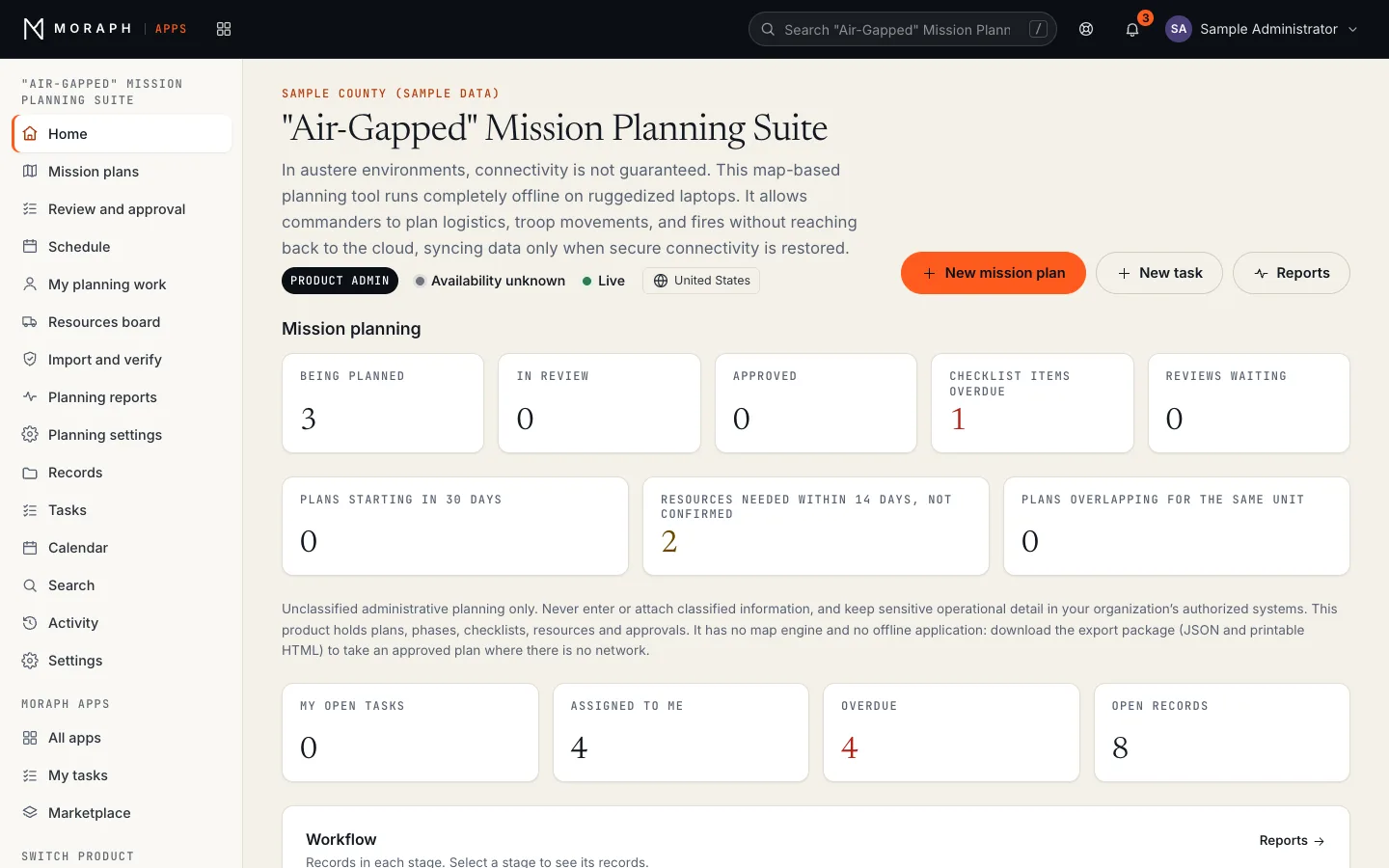
Mission Planning Workflow in Moraph Apps: the product home for a sample organization, with the Mission planning panel; counts for being planned, in review, approved, checklist items overdue; workflow stages (Mission plans: Draft, In planning, In review, Approved, Superseded, Cancelled). All names and values are sample data.
Mission Planning Workflow as it runs in the current build of Moraph Apps, with sample data (build d889d9719, 2026-11-08). Records, names and figures are placeholders, not client data.
Notes on this screen (4)
  1. Product navigation This product’s own pages, then the records, tasks, calendar, search and activity every Moraph product shares.
  2. Mission planning Unclassified administrative planning only.
  3. New mission plan Creates a record in this product. A person fills it in; the product checks it against its rules before saving.
  4. Your work Open tasks, records assigned to you, overdue records and open records in this product, counted from its records.

Workflows

The principal workflows

  1. Set up

    Product administrators set who approves, how many reviews each round needs, the marking printed on export packages, and the movement and sustainment planning factors, and keep standard checklist sets and planning templates ready.

    5 steps
    • Approvers and review areas chosen in Planning settings
    • March speed, halts, vehicle gap and sustainment factors entered
    • Planning templates and standard checklist sets prepared
    • Export marking set for the packages, for example UNCLASSIFIED
    • Planners, reviewers and approvers given product roles in the Moraph Portal
  2. Plan

    Planners build the plan as records: phases with objectives and dates, checklist items, resources, and movement legs with places, distances and departure times. Places are described in text; maps stay in your own systems.

    5 steps
    • Planner creates the plan from a template or a previous plan
    • Phases, checklist items, resources and movement legs added to the plan
    • Movement and sustainment tables calculated from distances and planning factors
    • Courses of action compared side by side
    • Plan moved to In review, with reviews requested by area
  3. Approve and issue

    Reviewers answer by area, and a designated approver who didn't create the plan approves a version or returns it. The approved version is locked and stored as an export package for issue.

    5 steps
    • Commander reviews the plan and its courses of action
    • Comments returned to planners, or a version approved
    • Approved version locked; further changes create a new version
    • JSON and printable HTML package stored with its SHA-256 fingerprint
    • Package downloads logged and each copy issued recorded in the issue log
  4. Carry and verify

    Where there is no network, people use the printed or downloaded package. Back on the network, a package someone holds can be checked against the approved one, and a package from another workspace imported as a new draft. Nothing is synced or merged.

    5 steps
    • Package printed or carried on approved media
    • Package file or fingerprint checked against the approved package
    • Package from another workspace imported as a draft plan
    • Changes since the previous approved version listed for review
    • Downloads, imports and issues recorded in the plan history

Roles and permissions

Who does what in the product

Your organization's administrators and technical leads give each person one of the roles below in the Moraph Portal under People and access. Each time someone's product access is given, changed or removed, it is recorded in the product's Activity.

Show each role and the permissions matrix

Viewer

People who read plans and carry approved packages without changing them, such as subordinate leaders, after-action reviewers and inspectors

Sees the workspace without changing it.

Sees

  • Every plan, phase, checklist item, resource, movement leg, review and other record in the workspace
  • Readiness checks, plan history, reports and export packages
  • Tasks and progress across the workspace

Does

  • Downloads export packages (JSON and printable HTML)
  • Checks a package file or fingerprint against the approved package

Cannot

  • Add, change or move records
  • Export lists or plan history as CSV files
  • Import packages or record who received a package
  • See or change Planning settings
Approvals
None.
Notified about
Nothing from the product by default.

User

Operations and logistics planners, staff reviewers, and commanders named as approvers

Does the day-to-day work: tasks, records and workflow steps.

Sees

  • Every record in the workspace
  • Readiness checks, plan history, reports and export packages
  • Their own planning work and tasks, and the rest of the team's

Does

  • Builds plans from phases, checklist items, resources, movement legs, risks, decision points, communications lines and the other record types, and sends them for review
  • Answers reviews, records checklist progress and scores courses of action
  • Copies plans and templates, starts a new version of an approved plan, and imports packages as new draft plans
  • Downloads packages, records who received them and exports lists and plan history as CSV files
  • Approves plans or returns them for changes when Planning settings name them as an approver

Cannot

  • Approve or return a plan unless Planning settings name them as an approver
  • Approve a plan they created
  • Change an approved version: changes start a new version
  • Accept a risk at or above the level Planning settings set for acceptance unless they are a plan approver (no level is set by default)
  • See or change Planning settings
Approvals
Approves a plan version or returns it only when Planning settings name them as an approver, and never a plan they created; approving over a reviewer's non-concurrence needs a note.
Notified about
When a record or task is assigned to them, and when work assigned to them is due soon or overdue. Also when a plan they own or created is approved or returned, and, when named as an approver, when a plan enters review.

Product administrator

The people who run the product for your organization, such as planning administrators

Everything a User can do, plus the product's settings and reference data.

Sees

  • Every record in the workspace
  • Planning settings and the workspace settings
  • Recently deleted records

Does

  • Approves plans or returns them for changes when Planning settings name no approvers
  • Sets Planning settings: approvers, review areas and answered reviews needed, resource, sustainment, risk and communications rules for approval, export marking, planning factors, checklist sets and reminder periods
  • Adds newer record types, changes the workspace's record types, fields and workflow stages, and restores deleted records

Cannot

  • Give people access to the product or change their roles: your organization's administrators and technical leads do that in the Moraph Portal under People and access
  • Approve a plan they created
  • Approve or return plans when Planning settings name approvers and they aren't one of them
  • Change an approved version: changes start a new version
Approvals
Approves a plan version or returns it when Planning settings name no approvers or name them as one, never a plan they created; approving over a reviewer's non-concurrence needs a note.
Notified about
When a record or task is assigned to them, and when work assigned to them is due soon or overdue. Also when a plan enters review while they are an approver.

Permissions at a glance

ActionViewerUserProduct administrator
See every plan, its readiness, history and reportsFullFullFull
Download export packages and check a package against the approved oneFullFullFull
Export lists and plan history as CSV filesNo accessFullFull
Build plans and their records, and send a plan for reviewNo accessFullFull
Answer reviews and record checklist progressNo accessFullFull
Start a new version, copy plans and import packagesNo accessFullFull
Approve a plan version or return it (approvers named in Planning settings, otherwise product administrators; never a plan they created)No accessApprovesApproves
Accept a risk at the level Planning settings require before approval (plan approvers only; off by default)No accessApprovesApproves
See and change Planning settings and the workspace settingsNo accessNo accessFull
Restore deleted recordsNo accessNo accessFull
Give people access and roles (in the Moraph Portal, by your organization's administrators and technical leads)No accessNo accessNo access
  • Full
  • Approves
  • No access

How access is controlled

  • Rules the product enforces: a plan enters review only with every phase and movement leg ready; it is approved only through Approve or return, by an approver who didn't create it, once required checklist items, answered reviews and the other checks Planning settings ask for are met; and an approved version is locked, so changes start a new version that goes back for approval.
  • Approvers are the people Planning settings name, who can hold the User or Product administrator role; when nobody is named, product administrators approve.
  • Access isn't limited by unit: everyone with access sees every plan in the product.
  • Roles are given to each person by your organization's administrators and technical leads in the Moraph Portal under People and access.
  • Each time someone's product access is given, changed or removed, it is recorded in the product's Activity.

Features

What it does

Export package for use without a network

The approved plan is stored as a JSON file and a self-contained printable HTML file to print or carry on approved media; the product itself runs online in Moraph Apps.

Places described in text

Locations, from and to points and distances are entered as place names and kilometres measured in your own map systems; the product has no map engine and stores no map data.

Phases and transition criteria

Each phase has a sequence, objective, dates, lead element and the criteria for moving to the next phase, and every phase must be Ready before the plan goes into review.

Movement planning

Movement legs with serials, places, distances and departure times, and a march table of driving time, halts, arrival and tail clearance calculated from the planning factors your unit sets.

Sustainment planning

Estimates of people × days × the amount per person per day you set for each item, compared with the plan's resources to show any shortfall.

Checklists

Checklist items by phase, standard checklist sets applied in one step, and a board to record progress on many items; required items must be done before approval.

Courses of action

Several versions of a plan built and compared side by side, with the differences in dates, phases, resources, movement and sustainment listed.

Versioned approval

A designated approver approves a specific version, which is then locked; any later change starts a new version.

Package verification and import

A package file or fingerprint is checked against the approved package, and a package from another workspace can be imported as a new draft plan. Nothing is synced.

Issue log

Each copy of an approved package is recorded with who received it and how, such as a printed copy or approved removable media.

Printable products

The plan package prints from its HTML file, and movement tables, checklists, resources and plan history download as CSV for briefings.

Plan history

Every change, approval, return, package download and issue is recorded with the person and time, and listed per plan for after-action review.

Reporting

What you can report on

10 standard reports, grouped by who uses them. Each shows who it is for, how it can be broken down, how it is delivered and what it is used for. The data behind them is also available to your own reporting tools.

Show all 10 reports

Operational

Plan status

For commander and planners

Every plan with its version, stage, owner and approver.

Break down by
Plan, Status, Owner, Unit
Delivered as
Mission plans and planning reports pages; plan register CSV
Used for
Knowing which version is approved and what is still in work.

Changes since approval

For commander and planners

Every change made to a plan since its last approved version, with who made it and when.

Break down by
Plan, Record type, User
Delivered as
Changes since the previous version page
Used for
Deciding whether changes need the commander's approval before issue.

Movement and sustainment tables

For planners and subordinate leaders

Movement legs, march timings and the sustainment estimate from the plan.

Break down by
Unit, Phase, Serial, Sustainment item
Delivered as
Movement table and sustainment panel; movement CSV; export package
Used for
Issuing the plan in a form units can carry and brief.

Resources and approvals

Resources board

For logistics planners and planning administrators

Resources not yet confirmed and needed in the coming days, soonest first, by provider.

Break down by
Provider, Category, Needed by
Delivered as
Resources board; CSV export
Used for
Making sure what each plan needs is arranged in time.

Approval cycle and review turnaround

For approvers and planning administrators

Days from review to approval, review rounds per plan, and how quickly each review area answers.

Break down by
Plan, Review area, Date, Recommendation
Delivered as
Planning reports; CSV export
Used for
Finding where plans wait longest for review and approval.

Approved versions by approver

For commanders and planning administrators

Approved plan versions counted by approver, with the latest each approved.

Break down by
Plan, Approver, Version
Delivered as
Planning reports; CSV export
Used for
Checking that plans were approved by the designated approvers.

Review and audit

Plan history

For commanders, after-action review staff and inspectors

How a plan developed, from first draft through each version, comment and approval.

Break down by
Plan, Version, User, Date range
Delivered as
Plan history page; CSV export for users and product administrators
Used for
After-action review and lessons learned.

Package downloads and issues

For security staff and administrators

Every package download and issue recorded, by person and plan.

Break down by
User, Plan, Version, Format
Delivered as
Planning reports; CSV export
Used for
Accounting for plan information that left the application.

Audit record extract

For inspectors and security staff

Who did what and when, for a selected period, person or record type, without field values.

Break down by
Plan, Record type, User, Date range
Delivered as
Activity page; CSV export (product administrators)
Used for
Answering inspection and investigation requests.

Access review

For commanders and administrators

Who has the Viewer, User or Product administrator role, and who is named as an approver in Planning settings.

Break down by
Role, Approver, Person
Delivered as
Moraph Portal (People and access) and Planning settings
Used for
Periodic certification of who can plan, approve and administer.
Exports, access and evidence
  • Operational pages run in Moraph Apps; the approved package and the movement table can be printed or downloaded for briefings without a network.
  • Planning reports bring together plans by stage and approver, the approval cycle, review turnaround and package downloads and issues from the records in this product.
  • Reports, plan history and the plan register download as CSV, and plans and records are available to your archive through the Moraph Work API.
  • Everyone with access sees every plan; reviewers can be given the read-only Viewer role to read plan history.
  • Every package download and CSV export is itself recorded in the activity.

Integrations

The systems it works alongside

Mission Planning Workflow: related requirements and the systems it connects toRelated requirementsWorks alongsideMission Planning WorkflowJoint Publication 5-0, Joint PlanningJoint Publication 5-0, Joint PlanningMIL-STD-2525, Joint Military SymbologyMIL-STD-2525, Joint Military SymbologyDoD RMF (DoDI 8510.01): DoD Instruction 8510.01, Risk Management Framework for DoD SystemsDoD RMF (DoDI 8510.01)CNSSI 1253, Security Categorization and Control Selection for National Security SystemsCNSSI 1253NIST SP 800-53 Rev. 5, Security and Privacy Controls for Information Systems and OrganizationsNIST SP 800-53FIPS 140-3, Security Requirements for Cryptographic ModulesFIPS 140-3Maps and geospatial systems: The product has no map engine and stores no maps, imagery, overlays or coordinates; planners describe places in text and measure distances in your own authorized systems.Maps and geospatial systemsUnit and equipment data: Resources, checklist items and movement legs loaded by CSV import or through the Work API from your own systems, or entered by planners.Unit and equipment dataPlan exchange formats: Approved plans exported as a JSON package (format moraph-mission-plan-package) and a printable HTML file, for other approved systems to read.Plan exchange formatsMoving plans between workspaces: There is no sync: a JSON package downloaded in one workspace is carried on approved media and imported in another as a new draft plan.Moving plans between workspacesIdentity and sign-in: Users sign in to Moraph Apps through single sign-on at portal.moraph.com; there is no sign-in on a device and no smart card support.Identity and sign-inTactical edge infrastructure: The product installs nothing on devices; approved packages can be carried on approved media to edge devices your unit manages, including with Moraph's Tactical Edge Compute Node Manager.Tactical edge infrastructureWork API: Plans, phases, checklist items, resources, movement legs and reviews are available to your reporting and archive systems through the Moraph Work API.Work API
Each requirement links to its requirement page and each system to the integrations directory. Meeting a requirement remains your organization’s responsibility.
The diagram as a list

Related requirements

  • Joint Publication 5-0, Joint PlanningJoint Publication 5-0, Joint Planning
  • MIL-STD-2525, Joint Military SymbologyMIL-STD-2525, Joint Military Symbology
  • DoD RMF (DoDI 8510.01)DoD Instruction 8510.01, Risk Management Framework for DoD Systems
  • CNSSI 1253CNSSI 1253, Security Categorization and Control Selection for National Security Systems
  • NIST SP 800-53NIST SP 800-53 Rev. 5, Security and Privacy Controls for Information Systems and Organizations
  • FIPS 140-3FIPS 140-3, Security Requirements for Cryptographic Modules

Works alongside

  • Maps and geospatial systemsMaps and geospatial systems: The product has no map engine and stores no maps, imagery, overlays or coordinates; planners describe places in text and measure distances in your own authorized systems.
  • Unit and equipment dataUnit and equipment data: Resources, checklist items and movement legs loaded by CSV import or through the Work API from your own systems, or entered by planners.
  • Plan exchange formatsPlan exchange formats: Approved plans exported as a JSON package (format moraph-mission-plan-package) and a printable HTML file, for other approved systems to read.
  • Moving plans between workspacesMoving plans between workspaces: There is no sync: a JSON package downloaded in one workspace is carried on approved media and imported in another as a new draft plan.
  • Identity and sign-inIdentity and sign-in: Users sign in to Moraph Apps through single sign-on at portal.moraph.com; there is no sign-in on a device and no smart card support.
  • Tactical edge infrastructureTactical edge infrastructure: The product installs nothing on devices; approved packages can be carried on approved media to edge devices your unit manages, including with Moraph's Tactical Edge Compute Node Manager.
  • Work APIWork API: Plans, phases, checklist items, resources, movement legs and reviews are available to your reporting and archive systems through the Moraph Work API.
How data moves with each system (7)
Works alongsideHowWhat flows
Maps and geospatial systemsThe product has no map engine and stores no maps, imagery, overlays or coordinates; planners describe places in text and measure distances in your own authorized systems.In: place names and distances entered by planners.
Unit and equipment dataResources, checklist items and movement legs loaded by CSV import or through the Work API from your own systems, or entered by planners.In: resources, checklist items and movement legs.
Plan exchange formatsApproved plans exported as a JSON package (format moraph-mission-plan-package) and a printable HTML file, for other approved systems to read.Out: plan, phases, checklist, resources, movement legs with calculated times, sustainment estimate and reviews. In: packages from another workspace, imported as draft plans.
Moving plans between workspacesThere is no sync: a JSON package downloaded in one workspace is carried on approved media and imported in another as a new draft plan.In and out: JSON packages; reviews and approvals are not carried over.
Identity and sign-inUsers sign in to Moraph Apps through single sign-on at portal.moraph.com; there is no sign-in on a device and no smart card support.In: user identity; product roles are granted in the Moraph Portal.
Tactical edge infrastructureThe product installs nothing on devices; approved packages can be carried on approved media to edge devices your unit manages, including with Moraph's Tactical Edge Compute Node Manager.Out: export package files, carried on approved media.
Work APIPlans, phases, checklist items, resources, movement legs and reviews are available to your reporting and archive systems through the Moraph Work API.Out: plan versions with their approval fields, and the records linked to them. In: checklist items and resources.

The product doesn’t connect to these systems itself: data moves through the Moraph Work API, CSV import, exports or staff entry, as each row says.

Security and evidence

How your data is protected

Sign-in

Users sign in to Moraph Apps through single sign-on at portal.moraph.com, and product roles are granted in the Moraph Portal.

Role-based access

What each person can do follows their product role; building a plan is separate from approving it, and nobody approves a plan they created.

Package integrity

Plans are held in Moraph Apps, not on devices; each approved package carries a SHA-256 fingerprint so a copy can be checked, and files on removable media are protected under your own procedures.

Unclassified only

The product is for unclassified administrative planning: classified markings are refused on export packages and imports, and sensitive operational detail stays in your authorized systems.

Complete audit trail

Every change, approval, package download and issue is logged with the person and time, and the product offers no way to edit that history.

Your authority

The Suite is for unclassified use only and isn't operated on classified networks.

The evidence trail

What Mission Planning Workflow records, and the reports that show it to a reviewer.

  1. Recorded

    Complete audit trail

    Every change, approval, package download and issue is logged with the person and time, and the product offers no way to edit that history.

  2. Change record

    Changes since approval

    Every change made to a plan since its last approved version, with who made it and when.

  3. Access record

    Access review

    Who has the Viewer, User or Product administrator role, and who is named as an approver in Planning settings.

  4. Audit evidence

    Audit record extract

    Who did what and when, for a selected period, person or record type, without field values.

Request security information

Company-wide controls, data residency and subprocessors are described in our Trust Center, where you can send a request for security information.

Deployment

Where and how it runs

Printable plan package

The approved plan downloads as a fingerprinted JSON file and a printable page that people carry where there is no network; the workspace itself needs a connection.

Import at home station

A downloaded package can be imported into another workspace as a new draft; there is no sync service, and changes made elsewhere come back only by import.

Exercises

Exercises are planned in the same workspace as operations: each plan names the operation, exercise, deployment or event it supports. Moraph does not host a separate training environment.

With edge infrastructure

Can be used alongside Moraph's Tactical Edge Compute Node Manager, which keeps the record of field nodes and their software updates; the two products don't exchange data.

Moraph Apps, and how the product is put together

Runs in Moraph Apps, the workspace shared by every Moraph-built product. Sign-in, roles, the audit trail, reports and the Work API are the same in every product; record types, fields, stages, roles and reports are configured for your organization during implementation, and anything beyond configuration is scoped as project work.

How a Moraph product is put together Your staff sign in once through the Moraph client portal and use the product in Moraph Apps, which runs on Cloudflare's global network and provides records, workflow, tasks, search, roles and the audit trail. The product's own services and your primary data run on Cloudflare too: the database is stored in one Cloudflare location and is not restricted to a jurisdiction. Your systems connect to the product through the Work API and the integrations agreed in the design. Your organization Your staffbrowser or mobile Your systemsyour existing software Cloudflare global network Client portalone Moraph sign-in, two-step, roles Moraph Apps records, workflow stages, taskssearch, reports, rolesaudit trailWork API (/api/v1) Moraph data on Cloudflare Product servicesthe product’s own processingand integrations Primary dataone database, not restrictedto a jurisdiction
How every Moraph product is put together. Sign-in and the shared workspace run on Cloudflare’s global network; the product’s own services and your primary data run there too, in a database that is not restricted to a jurisdiction. Each integration is specified in the design.

Security controls and data residency are set out in our Trust Center. Engagement models and what drives a quotation are on Working with Moraph.

Implementation

What a rollout involves

Every implementation follows the same phases, described on Working with Moraph. Their length depends on scope, so the plan in your proposal gives the dates.

  1. Discovery
  2. Design
  3. Implementation
  4. Migration
  5. Testing
  6. Go-live
  7. Ongoing operations

For Mission Planning Workflow, the work involves

  • Planning requirements

    We work with your planners to set up plan templates, planning factors, checklist sets and the marking printed on export packages.

  • Data loading

    We agree which resources, checklist items and templates are loaded by CSV import or the Work API, and how places are described without a map.

  • Export package handling

    We agree how approved packages are downloaded, printed, carried on approved media and recorded in the issue log.

  • Moving plans between workspaces

    We agree how packages move between workspaces on approved media and by import, and who verifies packages people hold.

  • Your organization's review

    Your reviewers can use the product documentation on roles and permissions, security and data, and the activity log for your organization's own review of the product for unclassified use. Moraph does not supply control mappings or test evidence for it.

  • Training and exercise

    Planners, commanders and planning administrators are trained on their own workflows, and the Suite is used in an exercise before operational use by agreement.

Who does what in each phase (7 phases)
PhaseMoraphYouAgreed outcome
DiscoveryWorkshops, a review of current processes and systems, and a written discovery summary with risks and assumptions.A sponsor, the people who do the work, existing documentation, and your security and compliance requirements.Signed-off scope, success measures and plan.
DesignSolution design, integration specifications, security and control mapping, and the test strategy.Decisions on design questions, and review by your architecture, security and compliance teams.An approved design. Later changes go through change control.
ImplementationConfiguration, integration build, environment setup, and regular demonstrations of progress.Access to the systems we integrate with, test accounts, and people available to review what is built.A build ready for testing.
MigrationThe migration approach, mapping, tooling, trial migrations and reconciliation reports.Extracts or access to source data, decisions about data quality and retention, and sign-off of reconciliations.A reconciled trial migration you have approved.
TestingSystem, integration, performance, security and accessibility testing, with defects fixed and retested.User acceptance testing by your own staff against the agreed success measures.Acceptance, recorded in writing, with any open issues and their owners listed.
Go-liveThe cut-over plan and rehearsal, final migration, go-live support, and close watch on the system immediately afterwards.A go or no-go decision against agreed readiness criteria, trained users, and communication to your organization.Production use, with a period of close support before handover.
Ongoing operationsRunbooks, handover to support (and to operations under a managed service), service reporting, and planning for updates and renewals.Named administrators and contacts, and a regular service review with us.Service measured against the levels in your agreement.

From Working with Moraph. Responsibilities between us are written into the plan in your proposal.

Release notes

Release history

Mission Planning Workflow

Generally available
End of support
None announced. At least 12 months’ notice before any end of support.

No version history is published for this product.

What the stages mean, how versions work and our end-of-support policy: Product lifecycle.

Limitations

What it does not do

Worth knowing before you evaluate it.

  • The Suite is a planning tool. It does not compute firing solutions, control weapons or replace your organization's command and control or fire support systems.
  • It does not track forces and has no map: places and distances are what planners enter, not live feeds.
  • It has no offline application and no sync: a downloaded package is fixed at its version, and changes made elsewhere come back only as a new draft by import.
  • Packages imported from another workspace arrive as new draft plans; nothing is merged, and reviews and approvals are not carried over.
  • Distances, places and planning factors come from your own maps and procedures; Moraph supplies no planning factors and doesn't check them.
  • Devices, removable media and procedures for lost packages are your organization's responsibility; the issue log records who received each copy.
  • It is for unclassified administrative planning only; never enter classified information. Moraph does not claim accreditation for any classified environment.
  • Plans and approvals in the Suite support the commander's decisions; they do not replace orders issued through your organization's procedures.

Evaluation checklist

What to test in a demonstration or pilot

Questions worth putting to us, and to any other vendor you are considering.

  1. Build a plan from start to approval, then download its package and open it on a laptop with no network
  2. Enter your planning factors and check the march table and sustainment estimate against your own
  3. Import a package from another workspace and verify a package file against its fingerprint
  4. Check that an approved version cannot be changed and that later edits start a new version
  5. Review the plan history and the package downloads and issues for one plan
  6. Confirm role separation: who can build, approve and export

Questions

Frequently asked questions

Does anything need a network to work?

Yes. The product runs online in Moraph Apps. To use a plan without a network, download the approved package (JSON and printable HTML) and print it or carry it on approved media.

Can a plan move between workspaces without a network link?

Yes, as a file. Download the JSON package in one workspace, carry it on approved media and import it in the other, where it arrives as a new draft plan. Nothing is synced or merged.

Does it need special hardware?

No. It runs in a current web browser with access to Moraph Apps, and nothing is installed. The printable HTML package opens in a browser without a network.

Is the Suite accredited for classified use?

No. It is for unclassified administrative planning only, and classified markings are refused on packages and imports. Moraph does not claim accreditation for any classified environment.

How is it priced?

As a subscription, usually measured by the number of people using it, with implementation charged separately. See Working with Moraph for what drives a quotation.

Is there an accessibility conformance report?

Ask for one through the procurement request form at /how-to-buy/request, naming the version you are evaluating.