Defense and intelligence · Moraph software

Insider Threat Case Management

Work insider threat referrals to an outcome, with oversight built in

At a glance

For
Insider threat hubs in defense and intelligence agencies
What it does
Collect → Triage → Inquire → Refer
Type and deployment
Moraph software, running in Moraph Apps. Your environment, Moraph cloud, With a managed service.
Availability
Generally available. What this means Release notes
Works alongside
User activity monitoring, Network and system logs, Human resources, Personnel security and 3 more

Request a demonstration See the walkthrough

What it does not do

  • The product does not decide that anyone is a threat. Referrals are prompts for review, and every closure, reveal and referral is decided by your people under your procedures.
  • It doesn't monitor anyone or analyze activity data. It is not a user activity monitoring tool and collects no data from endpoints or networks.
  • It sees only the concerns referred to it; it connects to no monitoring tool, log platform, HR or badge system.

All 8 limitations

Overview

What you are buying

Insider Threat Case Management is where your insider threat hub works the concerns referred to it by supervisors, security offices, hotlines or your own monitoring tool through the Work API. Analysts triage each referral, close it with a reason code or open a case with a written justification, and record indicators, legal and privacy reviews, identity reveals and referrals to outside authorities; reviews, reveals, referrals out and closures are each decided by someone other than the person who asked for them. It monitors no one and scores nothing; your analysts and your program's senior official decide.

The problem it solves

Insider threat hubs receive concerns from supervisors, security offices, hotlines and monitoring tools, by email and in separate systems. Triage decisions go unrecorded, context is added without a recorded justification, and the program must show at every step that monitoring respected privacy, civil liberties and whistleblower protections. When an inspector asks why an inquiry was opened or who looked at a subject's record, the record is incomplete.

  • Concerns arrive by email, phone and separate tools with no single queue
  • HR and security context is added to inquiries without a recorded justification
  • Identity reveal, legal review and referrals are tracked by email
  • Oversight bodies need evidence that monitoring stayed within policy
Who uses it and related requirements

Who uses it

  • Insider threat hubs in defense and intelligence agencies
  • Cleared contractors running NISPOM insider threat programs
  • Insider threat program senior officials and hub managers
  • Legal, privacy and civil liberties officers who review program activity
  • Inspectors general and oversight staff

Related requirements

Executive Order 13587, Structural Reforms to Improve the Security of Classified NetworksNational Insider Threat Policy and Minimum Standards for Executive Branch Insider Threat ProgramsCNSS Directive 504, Protecting National Security Systems from Insider ThreatDoD Directive 5205.16, The DoD Insider Threat Program32 CFR Part 117 (NISPOM), insider threat program requirements for cleared contractorsPrivacy Act of 1974 (5 U.S.C. 552a)

Listing a requirement here is not a statement that the product meets it; meeting it remains your organization's responsibility.

See how it works

A short walkthrough

Illustrative screens with fictional sample data. They show the workflow, not any client’s data or configuration, and the layout of the product itself differs. A live demonstration uses the product with sample data.

  1. Step 1

    The referral queue

    Analysts start from the referrals waiting for triage, under pseudonyms when sealing is on, each with what was reported and its age.

    ReferralUserConcern reportedPriorityAgeStatus
    RFL-90412User P-7731Large file transfer reported by your monitoring toolHigh1 dayNew
    RFL-90407User P-2209Supervisor report: late printing after departure noticeHigh1 dayIn review
    RFL-90396User P-5180Security office: access to repositories beyond needMedium2 daysIn review
    RFL-90381User P-0448Removable media use on a restricted hostMedium3 daysNew
    RFL-90377User P-6612Repeated failed access to restricted sharesLow4 daysClosed: approved project
    Analysts start from the referrals waiting for triage, under pseudonyms when sealing is on, each with what was reported and its age.
  2. Step 2

    What was reported

    Each referral shows what was reported and, when your monitoring tool sent it, the rule and factors that tool gave.

    User P-7731 · File transfer volume

    Concern reported
    Bulk copy to a local folder overnight (fictional)
    Source
    Another system through the Work API
    Detection rule (sending tool)
    Bulk copy against personal baseline
    Received on
    Fictional sample date
    Concern type
    Possible unauthorized disclosure

    Contributing factors, as the sending tool gave them

    • Volume far above the user's 90-day baseline
    • Activity outside the user's normal hours
    • Repositories not accessed by this user before
    Each referral shows what was reported and, when your monitoring tool sent it, the rule and factors that tool gave.
  3. Step 3

    Revealing an identity

    Seeing who the user is takes a written justification and an approval, both recorded.

    Reveal request · Inquiry CASE-1462 · User P-7731

    Requested by
    Analyst
    Basis
    Referral RFL-90412 not explained by role or approved project
    Category
    Standard
    Approver
    Hub manager
    Status
    Awaiting approval

    Context added after a cleared review

    • Role, department and supervisor
    • Departure or transfer notices
    • Clearance and program access status
    Seeing who the user is takes a written justification and an approval, both recorded.
  4. Step 4

    The inquiry

    The inquiry keeps the evidence, the analyst's assessment and every review, so oversight can follow each step.

    Inquiry CASE-1462 · Employee 70315 (fictional)

    1. Case opened from RFL-90412 with justificationAnalyst
    2. Identity reveal approvedHub manager
    3. Role and departure notice added from HRAnalyst
    4. Badge records added as context, with the referenceAnalyst
    5. Assessment: refer to security for interviewAnalyst
    6. Legal and privacy review: concurLegal and privacy reviewer
    7. Referral approvedSenior official
    The inquiry keeps the evidence, the analyst's assessment and every review, so oversight can follow each step.
  5. Step 5

    Concerns by detection rule

    Outcomes counts the concerns each rule in your own tool sent and what your staff decided, so the tool's owners can tune it.

    Detection ruleSending toolSource registerConcerns receivedClosed without a caseBecame cases
    After-hours printingUAM tool (fictional)Approved212740
    File transfer vs baselineUAM tool (fictional)Approved168921
    Removable media on restricted hostEndpoint tool (fictional)Approved31310
    Outcomes counts the concerns each rule in your own tool sent and what your staff decided, so the tool's owners can tune it.
  6. Step 6

    Oversight of hub staff

    Oversight sees which records hub staff opened, which identities they viewed, and what they approved and exported.

    Staff memberActionSubjectInquiryBasis
    Analyst 04Opened a caseUser P-7731CASE-1462On the case team
    Hub manager 01Approved revealUser P-7731CASE-1462Reveal request RV-3317
    Analyst 07Exported a reportCases listNoneExported cases (40 rows)
    Analyst 04Opened the referral packageEmployee 70315CASE-1462Approved referral
    Oversight sees which records hub staff opened, which identities they viewed, and what they approved and exported.

In the product

Annotated screens

The current build, with sample data. Select a numbered marker to read what it shows; the same notes are listed under the screen.

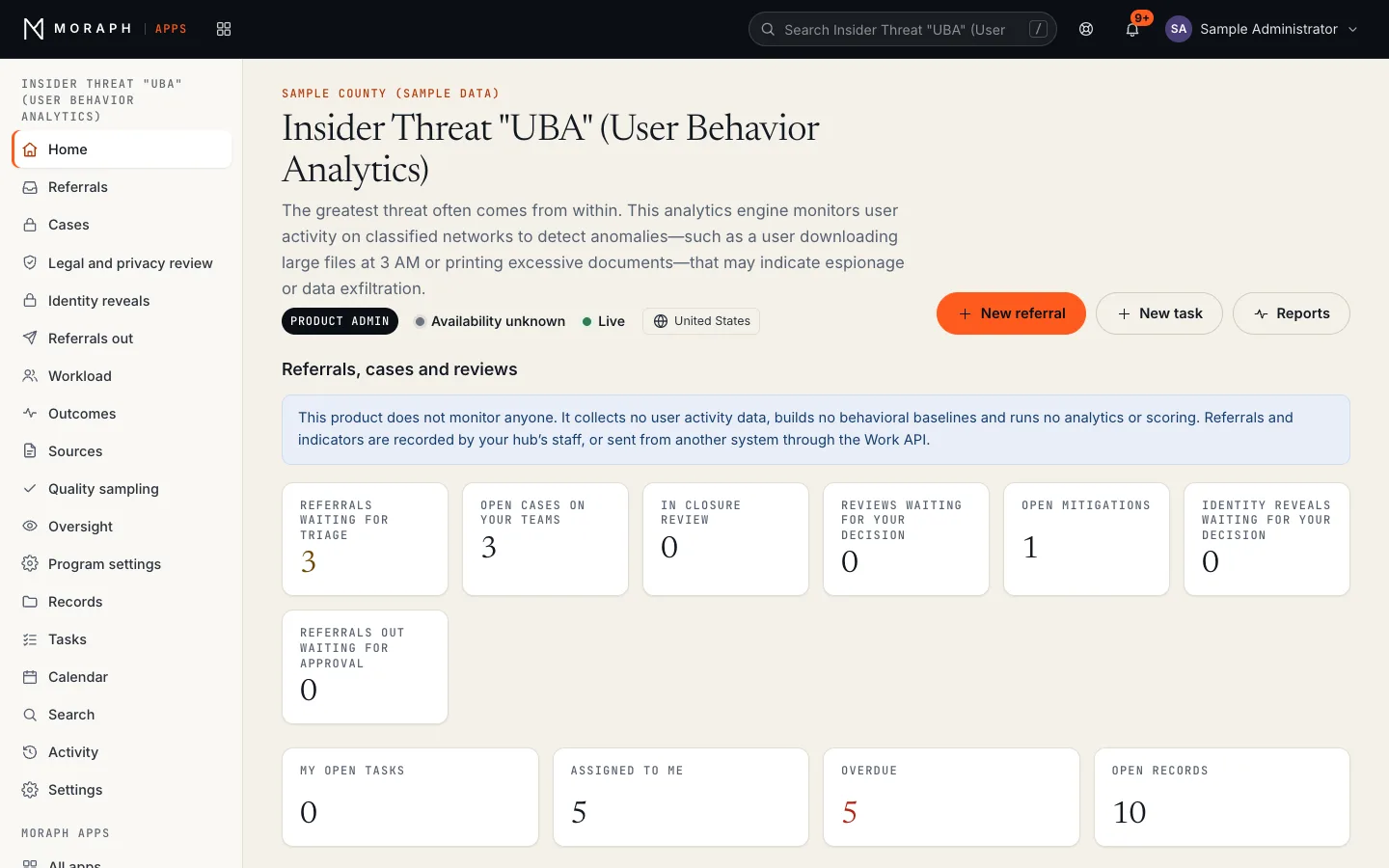
Insider Threat Case Management in Moraph Apps: the product home for a sample organization, with the Referrals, cases and reviews panel; counts for referrals waiting for triage, open cases on your teams, in closure review, reviews waiting for your decision; workflow stages (Referrals: Received, Triage, Case opened, Closed without a case). All names and values are sample data.
Insider Threat Case Management as it runs in the current build of Moraph Apps, with sample data (build d889d9719, 2026-11-08). Records, names and figures are placeholders, not client data.
Notes on this screen (3)
  1. Product navigation This product’s own pages, then the records, tasks, calendar, search and activity every Moraph product shares.
  2. New referral Creates a record in this product. A person fills it in; the product checks it against its rules before saving.
  3. Your work Open tasks, records assigned to you, overdue records and open records in this product, counted from its records.

Workflows

The principal workflows

  1. Collect

    Concerns reach the hub as referrals from the channels your program has authorized, entered by staff or sent through the Work API, with each source registered.

    4 steps
    • Referrals entered by hub staff from supervisors, security offices, hotlines and other referrers
    • Concerns from your own monitoring tool sent through the Work API, with its detection rule and factors
    • A task raised when an approved referral source sends nothing for its set days
    • Retention review dates set on closed cases from your records schedule
  2. Triage

    Analysts take each referral, check related records about the same subject, and close it with a reason code or open a case with a written justification.

    5 steps
    • Referrals waiting for triage listed by age, with unassigned ones ready to take
    • Possible related referrals and cases about the same subject shown on each referral
    • Referral closed with a reason code and written reason, or a case opened with justification
    • Subject identifiers sealed under a pseudonym when your program turns that on
    • Referrals closed without a case sampled for quality review by a product administrator who didn't close them
  3. Inquire

    Analysts record indicators and an assessment on the case. Moving to inquiry, revealing who the subject is and adding personnel or security context need a cleared review or an approval.

    5 steps
    • Indicators recorded with their source, corroboration and the analyst's significance
    • Legal and privacy review of opening the inquiry cleared before the case moves on
    • Identity reveal requested and approved under your procedures
    • HR, security and access context added from authorized sources
    • Findings and analyst assessment recorded
  4. Refer

    Where an inquiry warrants it, a referral is prepared for counterintelligence, law enforcement or the inspector general, reviewed by legal and privacy staff, and approved by a product administrator such as the senior official.

    5 steps
    • Analyst prepares the referral with the supporting record
    • Legal and privacy reviewer checks it against policy and protections
    • A product administrator who neither prepared it nor holds the case approves or returns the referral
    • Referral delivered through the channel your procedures require and receipt recorded
    • Outcome recorded when reported back to the hub

Roles and permissions

Who does what in the product

Your organization's administrators and technical leads give each person one of the roles below in the Moraph Portal under People and access. Each time someone's product access is given, changed or removed, it is recorded in the product's Activity.

Show each role and the permissions matrix

Viewer

Oversight staff, inspectors general and others who need to read without changing anything

Reads what they are given access to without changing it.

Sees

  • Referrals that aren't restricted
  • Cases and restricted referrals, with what is recorded on them, only when someone adds them to the case team
  • The oversight trail, only when a product administrator gives them oversight access until an end date

Does

  • Reads the oversight trail and exports it as a CSV file while their oversight access lasts

Cannot

  • Add, change or move records, or take part in triage, reviews, reveals or referrals
  • Export referrals, cases, reveals, referrals out or program figures
  • Change the program settings or the workspace settings
Approvals
None.
Notified about
Nothing by email.

User

Insider threat analysts and legal and privacy reviewers

Does the hub's day-to-day work: triage, cases, indicators, reviews, mitigations and referrals out.

Sees

  • Referrals that aren't restricted, and cases and restricted referrals only when they are on the case team
  • Their own tasks and the rest of the team's

Does

  • Takes and triages referrals, closes them with a reason or opens a case with a written justification
  • Records indicators, assessments, context, evidence, information requests and mitigations on cases they are on
  • Requests legal and privacy reviews and identity reveals, and prepares referrals to outside authorities
  • Adds or removes people on a case team, sends a case to Closure review, and exports lists as CSV files
  • Decides legal and privacy reviews when a product administrator names them a reviewer in Program settings

Cannot

  • See a case or restricted referral when they aren't on its team
  • Decide a review they requested or on a case they hold, or any review when they aren't a named reviewer
  • Approve closure of a case, approve a referral to an outside authority, decide an identity reveal or approve a source
  • Move a case to Inquiry before a review of opening it is cleared, while that rule is on (on by default)
  • Change the program settings or the workspace settings
Approvals
Decides legal and privacy reviews when a product administrator names them a reviewer in Program settings (no reviewers are named by default), but not a review they requested or on a case they hold.
Notified about
When a record or task is assigned to them, and when work assigned to them is due soon or overdue. The product's daily reminders (referrals waiting for triage, reviews and reveals waiting for a decision, idle cases, mitigations and information requests past their dates, retention reviews and quiet sources) arrive as tasks.

Product administrator

The hub manager and the program's senior official

Everything a User can do, plus the approvals and the program settings.

Sees

  • Referrals that aren't restricted, and cases and restricted referrals only when they are on the case team
  • The oversight trail, the program settings and the workspace settings
  • Recently deleted records

Does

  • Approves the closure of cases from Closure review, or returns them, and reopens closed cases with a reason
  • Approves or returns referrals to outside authorities and approves or declines identity reveals
  • Decides legal and privacy reviews while no reviewer is named in Program settings
  • Proposes, approves and retires sources in the register, records quality reviews of triage and places or releases preservation holds
  • Names reviewers, sets the review rules, pseudonymization and reminder days, and gives oversight access until an end date
  • Changes the workspace's record types, fields and workflow stages, manages Work API keys and restores deleted records

Cannot

  • Give people access to the product or change their roles: your organization's administrators and technical leads do that in the Moraph Portal under People and access
  • Approve closure of a case they hold or sent for closure review
  • Approve a referral out they prepared or on a case they hold, or decide a reveal they requested or on a case they hold
  • Approve a source they proposed, or review the triage of a referral they closed
Approvals
Approves case closures, referrals to outside authorities and identity reveals, but never one they asked for or on a case they hold. Decides legal and privacy reviews while no reviewer is named. Approves sources proposed by another product administrator.
Notified about
When a record or task is assigned to them, and when work assigned to them is due soon or overdue. The product's daily reminders (referrals waiting for triage, reviews and reveals waiting for a decision, idle cases, mitigations and information requests past their dates, retention reviews and quiet sources) arrive as tasks.

Permissions at a glance

ActionViewerUserProduct administrator
See unrestricted referralsFullFullFull
See a case or restricted referral (only when on its case team)Own work onlyOwn work onlyOwn work only
Read the oversight trail (Viewers and Users only with oversight access until an end date)View onlyView onlyFull
Triage referrals, open and work cases, and prepare referrals outNo accessFullFull
Export referrals, cases, reveals and program figures as CSV filesNo accessFullFull
Decide a legal and privacy review (named reviewers, or product administrators when none is named; not one you requested)No accessApprovesApproves
Approve a case's closure (not one you hold or sent for review)No accessNo accessApproves
Approve a referral to an outside authority (after a cleared review; not one you prepared or hold)No accessNo accessApproves
Approve or decline an identity reveal (not one you requested or hold)No accessNo accessApproves
Approve a source in the register (not one you proposed)No accessNo accessApproves
Change program settings and the workspace settingsNo accessNo accessFull
Restore deleted recordsNo accessNo accessFull
Give people access and roles (in the Moraph Portal, by your organization's administrators and technical leads)No accessNo accessNo access
  • Full
  • Own work only
  • Approves
  • View only
  • No access

How access is controlled

  • Cases are restricted to their case team, and so is everything recorded on them; Work API keys never see a case or anything restricted, and can't create cases.
  • Nobody approves a closure, referral out or reveal they asked for or whose case they hold, and nobody decides a review they requested. A referral out always needs a cleared legal and privacy review; opening an inquiry, approving a reveal and adding context need one too unless a product administrator turns that rule off.
  • Records opened, identities viewed, decisions and exports are recorded in the oversight trail, which product administrators and the people they give oversight access can read.
  • Roles are given to each person by your organization's administrators and technical leads in the Moraph Portal under People and access.
  • Each time someone's product access is given, changed or removed, it is recorded in the product's Activity.

Features

What it does

Referral triage

Concerns from supervisors, security offices, hotlines or your own monitoring tool arrive as referrals, are taken by an analyst and closed with a reason code or opened as a case.

Indicators with their source

Analysts record each potential risk indicator on a case with its category, source of information, corroboration and their own significance, in terms a reviewer can follow. The product doesn't score indicators.

Pseudonymized review

With sealing on, analysts work cases under pseudonyms; revealing a user's identity is a separate, approved and logged step.

Concerns from your monitoring tool

Your program's own monitoring tool can send the concerns it raises as referrals through the Work API, with the detection rule and contributing factors it gave. This product runs no detection itself.

Quality sampling

A repeatable sample of referrals closed without a case, for a product administrator who didn't close them to agree or disagree with each triage decision, kept as evidence for oversight.

Inquiry management

Assignment, due dates, notes, evidence and a recorded assessment for each inquiry, with closure approved by a product administrator who neither holds the case nor sent it for closure review.

Legal and privacy review

Built-in review steps for opening an inquiry, identity reveals, added context and referrals out, with the reviewer's decision recorded.

Referral tracking

Referrals to counterintelligence, law enforcement or the inspector general prepared, approved and tracked to an outcome.

Context enrichment

Role, department, departure notices and security records entered by an analyst with the source reference, once a review of adding them is cleared.

Watching the watchers

Records opened, identities viewed, decisions and exports by hub staff are logged and available to oversight, including analysts' own activity in the product.

Source register and coverage

Lists the referral channels and sources your program has authorized and when each last sent a referral, and raises a task when one goes quiet past its set days.

Disconnected deployment

Runs in an environment you operate, including networks with no outside connection, with content updates delivered through your approved transfer process.

Reporting

What you can report on

11 standard reports, grouped by who uses them. Each shows who it is for, how it can be broken down, how it is delivered and what it is used for. The data behind them is also available to your own reporting tools.

Show all 11 reports

Operational

Referral queue and aging

For analysts and the hub manager

Referrals waiting for triage and open cases with their age, assignee and stage, oldest first, and open work by person.

Break down by
Source, Analyst, Age band, Status
Delivered as
In the product; CSV export
Used for
Balancing workload and making sure nothing sits unreviewed.

Reveal requests

For the hub manager and legal and privacy reviewers

Identity reveal requests with their justification, who requested and approved them, and the time taken.

Break down by
Status, Requester, Approver, Category
Delivered as
In the product; CSV export
Used for
Keeping reveals within policy and showing each was justified.

Source coverage

For the hub manager, administrators and the senior official

Each authorized referral channel and source, its approval and review reference, when it last sent a referral, and any gone quiet past its days.

Break down by
Source, Network, Period, Status
Delivered as
In the product; a task when a source goes quiet
Used for
Knowing which referral channels have gone quiet and checking them.

Program management

Program summary

For the senior official and agency leadership

Referrals received and triaged, cases opened and closed by outcome, reviews, reveals, referrals out and outcomes reported, for the period.

Break down by
Period, Concern type, Referral destination
Delivered as
In the product; CSV export
Used for
Reporting on the program as the minimum standards and your directives require.

Referrals and outcomes

For the senior official and hub manager

Each referral with its legal review, approval, delivery and the outcome reported back.

Break down by
Destination, Status, Period
Delivered as
In the product
Used for
Tracking referrals to an outcome and showing each was reviewed and approved.

Triage quality

Concerns by detection rule

For monitoring tool owners and the hub manager

Concerns sent through the Work API by each rule in your own tool, and how many became cases or led to referrals out.

Break down by
Detection rule, Period, Outcome, Concern type
Delivered as
In the product; CSV export
Used for
Giving your tool's owners the figures to tune rules whose concerns rarely become cases.

Closure reasons

For monitoring tool owners and the hub manager

The reason codes recorded when referrals were closed without a case, by detection rule where one was given.

Break down by
Detection rule, Closure reason, Analyst, Period
Delivered as
In the product; CSV export
Used for
Showing which kinds of referral cost the most effort for the least value.

Quality sampling of triage

For the hub manager, the senior official and oversight

A repeatable sample of referrals closed without a case, with each reviewer's agree or disagree and note.

Break down by
Detection rule, Change date, Approver, Result
Delivered as
In the product
Used for
Showing that triage decisions to close without a case are checked by someone else.

Oversight

Hub staff activity

For oversight and the senior official

Records opened, identities viewed, changes, decisions, reports and exports by each member of hub staff, with the record each related to.

Break down by
User, Action, Inquiry, Date range
Delivered as
In the product; CSV export
Used for
Checking that hub staff used their access only for authorized purposes.

Source register changes

For oversight, legal and privacy reviewers

Each source proposed, approved or retired, with its legal and privacy review reference and who approved it.

Break down by
Source, Change date, Approver
Delivered as
In the product
Used for
Evidencing that sources were added only through the approved process.

Inquiry record

For oversight and the senior official

The full record of a case: the referral, justification, reveals, context added, indicators, reviews, mitigations and decisions.

Break down by
Inquiry, Action, User, Date range
Delivered as
On request in the product; printable page
Used for
Answering oversight questions about why an inquiry was opened and how it was handled.
Exports, access and evidence
  • Referrals, cases, reveals, referrals out, program figures and the oversight trail export to CSV, and the inquiry record and referral package are printable pages. Every export is logged in the oversight trail.
  • With sealing on, reports and exports show pseudonyms; identities appear only where the viewer's role and an approved reveal allow.
  • Referral records can be read through the Moraph Work API for reporting alongside other security data; keys never see cases or restricted records.
  • Reports count only what each viewer can see: cases and what is recorded on them count only for their case team, and oversight reads the trail until its end date.
  • The oversight trail can be filtered by date, person and action, and the product offers no way to edit its entries. Reading and exporting it is itself recorded in the trail.

Integrations

The systems it works alongside

Insider Threat Case Management: related requirements and the systems it connects toRelated requirementsWorks alongsideInsider Threat Case ManagementExecutive Order 13587, Structural Reforms to Improve the Security of Classified NetworksExecutive Order 13587, Structural Reforms to Improve the Security of…National Insider Threat Policy and Minimum Standards for Executive Branch Insider Threat ProgramsNational Insider Threat Policy and Minimum Standards for Executive Branch…CNSS Directive 504, Protecting National Security Systems from Insider ThreatCNSS Directive 504, Protecting National Security Systems from Insider ThreatDoD Directive 5205.16, The DoD Insider Threat ProgramDoD Directive 5205.16, The DoD Insider Threat ProgramNISPOM (32 CFR Part 117): 32 CFR Part 117 (NISPOM), insider threat program requirements for cleared contractorsNISPOM (32 CFR Part 117)Privacy Act of 1974 (5 U.S.C. 552a)Privacy Act of 1974User activity monitoring: Concerns your own monitoring tool raises can be sent as Referral records through the Work API by your team, with the detection rule and contributing factors. No activity data is collected.User activity monitoringNetwork and system logs: Not connected: what your log or SIEM team reports reaches the hub as a referral, entered by staff or sent through the Work API.Network and system logsHuman resources: Role, department, supervisor and departure notices entered on a case by an analyst, with the HR reference, once a review is cleared.Human resourcesPersonnel security: Clearance and access status entered by an analyst from your personnel security records, such as Moraph's Personnel Security Clearance Tracker, once a review is cleared.Personnel securityPhysical access: Badge records an analyst checks in your access control system can be entered on a case as context, with the reference.Physical accessCase and referral channels: Printable referral packages for counterintelligence, law enforcement or the inspector general, delivered by staff through the channel your procedures require.Case and referral channelsSign-in: Hub staff sign in with their Moraph account, using email and password and, optionally, two-step verification. Sign-in through your own identity provider (SAML or OpenID Connect) is not offered.Sign-in

Related requirements

  • Executive Order 13587, Structural Reforms to Improve the Security of Classified Networks
  • National Insider Threat Policy and Minimum Standards for Executive Branch Insider Threat Programs
  • CNSS Directive 504, Protecting National Security Systems from Insider Threat
  • DoD Directive 5205.16, The DoD Insider Threat Program
  • NISPOM (32 CFR Part 117)
  • Privacy Act of 1974

Insider Threat Case Management

Works alongside

Each requirement links to its requirement page and each system to the integrations directory. Meeting a requirement remains your organization’s responsibility.
The diagram as a list

Related requirements

  • Executive Order 13587, Structural Reforms to Improve the Security of Classified NetworksExecutive Order 13587, Structural Reforms to Improve the Security of Classified Networks
  • National Insider Threat Policy and Minimum Standards for Executive Branch Insider Threat ProgramsNational Insider Threat Policy and Minimum Standards for Executive Branch Insider Threat Programs
  • CNSS Directive 504, Protecting National Security Systems from Insider ThreatCNSS Directive 504, Protecting National Security Systems from Insider Threat
  • DoD Directive 5205.16, The DoD Insider Threat ProgramDoD Directive 5205.16, The DoD Insider Threat Program
  • NISPOM (32 CFR Part 117)32 CFR Part 117 (NISPOM), insider threat program requirements for cleared contractors
  • Privacy Act of 1974Privacy Act of 1974 (5 U.S.C. 552a)

Works alongside

  • User activity monitoringUser activity monitoring: Concerns your own monitoring tool raises can be sent as Referral records through the Work API by your team, with the detection rule and contributing factors. No activity data is collected.
  • Network and system logsNetwork and system logs: Not connected: what your log or SIEM team reports reaches the hub as a referral, entered by staff or sent through the Work API.
  • Human resourcesHuman resources: Role, department, supervisor and departure notices entered on a case by an analyst, with the HR reference, once a review is cleared.
  • Personnel securityPersonnel security: Clearance and access status entered by an analyst from your personnel security records, such as Moraph's Personnel Security Clearance Tracker, once a review is cleared.
  • Physical accessPhysical access: Badge records an analyst checks in your access control system can be entered on a case as context, with the reference.
  • Case and referral channelsCase and referral channels: Printable referral packages for counterintelligence, law enforcement or the inspector general, delivered by staff through the channel your procedures require.
  • Sign-inSign-in: Hub staff sign in with their Moraph account, using email and password and, optionally, two-step verification. Sign-in through your own identity provider (SAML or OpenID Connect) is not offered.
How data moves with each system (7)
Works alongsideHowWhat flows
User activity monitoringConcerns your own monitoring tool raises can be sent as Referral records through the Work API by your team, with the detection rule and contributing factors. No activity data is collected.In: referrals, with the rule and factors the tool gave.
Network and system logsNot connected: what your log or SIEM team reports reaches the hub as a referral, entered by staff or sent through the Work API.In: referrals, not log events.
Human resourcesRole, department, supervisor and departure notices entered on a case by an analyst, with the HR reference, once a review is cleared.In: context entered by staff with its source reference.
Personnel securityClearance and access status entered by an analyst from your personnel security records, such as Moraph's Personnel Security Clearance Tracker, once a review is cleared.In: eligibility and access status entered by staff. Out: nothing is sent.
Physical accessBadge records an analyst checks in your access control system can be entered on a case as context, with the reference.In: physical access context entered by staff.
Case and referral channelsPrintable referral packages for counterintelligence, law enforcement or the inspector general, delivered by staff through the channel your procedures require.Out: approved referral packages. In: receipt and outcome, recorded by hub staff.
Sign-inHub staff sign in with their Moraph account, using email and password and, optionally, two-step verification. Sign-in through your own identity provider (SAML or OpenID Connect) is not offered.None: accounts are kept in Moraph

The product doesn’t connect to these systems itself: data moves through the Moraph Work API, CSV import, exports or staff entry, as each row says.

Security and evidence

How your data is protected

Runs under your authority

On classified networks, the product is installed and operated in your environment under your authorizing official; Moraph does not claim accreditation for it.

Sign-in and role-based access

Hub staff sign in with their Moraph account, and pseudonymization, reveal approval and role limits control what each person sees.

Encryption

Data is stored in Cloudflare D1 and files in Workers KV, which Cloudflare encrypts at rest with keys Cloudflare manages, and every connection uses HTTPS. The product adds no encryption of its own to its records and files.

Complete audit trail

Every restricted record opened, identity viewed, change, decision and export is recorded with the person and time, and the product offers no way to edit that history.

People raise and decide

The product flags no one; concerns come from referrers, and closing, revealing, referring and any action affecting a person are decided by your staff.

The evidence trail

What Insider Threat Case Management records, and the reports that show it to a reviewer.

  1. Recorded

    Complete audit trail

    Every restricted record opened, identity viewed, change, decision and export is recorded with the person and time, and the product offers no way to edit that history.

  2. Change record

    Source register changes

    Each source proposed, approved or retired, with its legal and privacy review reference and who approved it.

Request security information

Company-wide controls, data residency and subprocessors are described in our Trust Center, where you can send a request for security information.

Deployment

Where and how it runs

Your environment

Installed in an environment you operate, including classified and disconnected networks, under your authorizing official.

Moraph cloud

For monitoring of unclassified networks only, hosted by Moraph on Cloudflare's network with controls mapped to support your own authorization.

With a managed service

Optionally supported by a Moraph managed service for platform administration and content updates, under your authority.

Moraph Apps, and how the product is put together

Runs in Moraph Apps, the workspace shared by every Moraph-built product. Sign-in, roles, the audit trail, reports and the Work API are the same in every product; record types, fields, stages, roles and reports are configured for your organization during implementation, and anything beyond configuration is scoped as project work.

How a Moraph product is put together Your staff sign in once through the Moraph client portal and use the product in Moraph Apps, which runs on Cloudflare's global network and provides records, workflow, tasks, search, roles and the audit trail. The product's own services and your primary data run on Cloudflare too: the database is stored in one Cloudflare location and is not restricted to a jurisdiction. Your systems connect to the product through the Work API and the integrations agreed in the design. Your organization Your staffbrowser or mobile Your systemsyour existing software Cloudflare global network Client portalone Moraph sign-in, two-step, roles Moraph Apps records, workflow stages, taskssearch, reports, rolesaudit trailWork API (/api/v1) Moraph data on Cloudflare Product servicesthe product’s own processingand integrations Primary dataone database, not restrictedto a jurisdiction
How every Moraph product is put together. Sign-in and the shared workspace run on Cloudflare’s global network; the product’s own services and your primary data run there too, in a database that is not restricted to a jurisdiction. Each integration is specified in the design.

Security controls and data residency are set out in our Trust Center. Engagement models and what drives a quotation are on Working with Moraph.

Implementation

What a rollout involves

Every implementation follows the same phases, described on Working with Moraph. Their length depends on scope, so the plan in your proposal gives the dates.

  1. Discovery
  2. Design
  3. Implementation
  4. Migration
  5. Testing
  6. Go-live
  7. Ongoing operations

For Insider Threat Case Management, the work involves

  • Program and policy review

    We start from your insider threat policy, monitoring consent and banners, and reveal and referral procedures, and configure the product to follow them, with your legal and privacy staff involved.

  • Referral source onboarding

    Each authorized referral channel is registered with its legal and privacy review, and any system sending referrals is given a Work API key and mapped to the Referral record.

  • Reminders and retention

    Triage, review, assessment and follow-up days and the retention review period are set from your program's policies and records schedule.

  • Practice cases

    Practice referrals are worked through triage, review, reveal, referral out and closure with your hub, and the oversight trail checked, before go-live.

  • Workflow and roles

    Queues, reason codes, reveal and referral approvals, legal review steps and roles are configured to match your procedures.

  • Training and go-live

    Analysts, managers, reviewers and oversight staff get training on their own tasks, and open matters from earlier tools are moved across or finished there by agreement.

Who does what in each phase (7 phases)
PhaseMoraphYouAgreed outcome
DiscoveryWorkshops, a review of current processes and systems, and a written discovery summary with risks and assumptions.A sponsor, the people who do the work, existing documentation, and your security and compliance requirements.Signed-off scope, success measures and plan.
DesignSolution design, integration specifications, security and control mapping, and the test strategy.Decisions on design questions, and review by your architecture, security and compliance teams.An approved design. Later changes go through change control.
ImplementationConfiguration, integration build, environment setup, and regular demonstrations of progress.Access to the systems we integrate with, test accounts, and people available to review what is built.A build ready for testing.
MigrationThe migration approach, mapping, tooling, trial migrations and reconciliation reports.Extracts or access to source data, decisions about data quality and retention, and sign-off of reconciliations.A reconciled trial migration you have approved.
TestingSystem, integration, performance, security and accessibility testing, with defects fixed and retested.User acceptance testing by your own staff against the agreed success measures.Acceptance, recorded in writing, with any open issues and their owners listed.
Go-liveThe cut-over plan and rehearsal, final migration, go-live support, and close watch on the system immediately afterwards.A go or no-go decision against agreed readiness criteria, trained users, and communication to your organization.Production use, with a period of close support before handover.
Ongoing operationsRunbooks, handover to support (and to operations under a managed service), service reporting, and planning for updates and renewals.Named administrators and contacts, and a regular service review with us.Service measured against the levels in your agreement.

From Working with Moraph. Responsibilities between us are written into the plan in your proposal.

Release notes

Release history

Insider Threat Case Management

Generally available
End of support
None announced. At least 12 months’ notice before any end of support.

No version history is published for this product.

What the stages mean, how versions work and our end-of-support policy: Product lifecycle.

Limitations

What it does not do

Worth knowing before you evaluate it.

  • The product does not decide that anyone is a threat. Referrals are prompts for review, and every closure, reveal and referral is decided by your people under your procedures.
  • It doesn't monitor anyone or analyze activity data. It is not a user activity monitoring tool and collects no data from endpoints or networks.
  • It sees only the concerns referred to it; it connects to no monitoring tool, log platform, HR or badge system.
  • Your organization is responsible for monitoring consent, banners, legal authority and protections for privacy, civil liberties and whistleblowers.
  • It does not take action against users or systems, such as blocking accounts or transfers.
  • It is not a counterintelligence case management or law enforcement investigation system; referrals are passed to those functions.
  • Moraph holds no accreditation for classified networks. Use there depends on your authorizing official, and operations happen under your authority.
  • It builds no baselines and scores no behavior; a detection rule on a referral is the one the sending system reported.

Evaluation checklist

What to test in a demonstration or pilot

Questions worth putting to us, and to any other vendor you are considering.

  1. Record a sample of your own past referrals and work them through triage to a case or a reason code
  2. Check that each triage reason and case justification would make sense to oversight
  3. Follow a referral through reveal, inquiry, legal review and referral approval
  4. Confirm what someone outside a case team, and a Work API key, can and cannot see
  5. Review the hub staff activity report as your oversight body would
  6. Send a test concern through the Work API with a detection rule and find it on Outcomes

Questions

Frequently asked questions

Does the product decide who is an insider threat?

No. It flags no one and scores nothing: concerns arrive as referrals, your analysts decide what to do with each one, and referrals out need a cleared legal and privacy review and a product administrator's approval.

Can it run on our classified networks?

It can be installed in an environment you operate, including classified and disconnected networks, where your authorizing official approves it. Operations there are under your authority, and Moraph does not claim accreditation.

Does it replace our user activity monitoring tools?

No. It doesn't analyze their data. Concerns those tools raise can be sent in as referrals through the Work API, and the product adds triage, case management, reviews and oversight.

How are privacy and civil liberties protected?

Analysts can work under pseudonyms, identity reveals and referrals need approval, legal and privacy review is a required step, and every action by hub staff is visible to oversight. Your program sets and remains responsible for the policies these controls follow.

How is it priced?

As a subscription, with implementation charged separately. See Working with Moraph for what drives a quotation.

Is there an accessibility conformance report?

Ask for one through the procurement request form at /how-to-buy/request, naming the version you are evaluating.