Federal civilian · Moraph software

Patent & Trademark Examination Workflow

Keep the search record, references and office actions in one place, and leave every determination with the examiner

At a glance

For
Patent examiners and supervisory patent examiners in a national intellectual property office
What it does
Understand the application → Search → Review → Record
Type and deployment
Moraph software, running in Moraph Apps. Moraph cloud, With a managed service.
Availability
Generally available, version 1.7. What this means Release notes
Requirements it supports
  • 35 U.S.C. 102 (novelty) and 35 U.S.C. 103 (obviousness)
  • 35 U.S.C. 122 (confidential status of applications)
  • Rules of practice in patent cases (37 CFR Part 1)
  • Manual of Patent Examining Procedure (MPEP)
  • 2 more
Connects to
Case management system, Patent document collections, Non-patent literature sources, Trademark register and 2 more

Book a demonstration See the walkthrough

What it does not do

  • It does not decide patentability or registrability. Examiners decide what is relevant and make every determination, and the office's procedures apply.
  • It doesn't search for prior art or conflicting marks. Examiners search in their own tools, or your office's search tool sends its results through the Work API.
  • It doesn't connect to any patent, literature or trademark database; the search sources register records what examiners search and when each source was last updated.

All 8 limitations

Overview

What you are buying

This product is where examiners record the searches they run in their own tools, the references and marks they find, their relevance decisions and the office actions they draft from your templates. It builds a claim chart from the passages recorded against each claim element, compares cited marks by spelling, sound code and overlapping classes, and keeps the full search history. It doesn't search for prior art, rank results, translate or use AI; examiners decide what is relevant and make every determination.

The problem it solves

Examiners have a limited amount of time for each application, and much of it goes into keeping track of what was searched where, which passages support which claim elements, and when the applicant's response is due. Similar marks may differ in spelling or sound rather than in letters. When a search is questioned later, during quality review, appeal or litigation, the record of where the examiner looked and why can be thin.

  • Searches run in separate patent and literature tools, with no single record of what was searched
  • Passages from documents in another language are relied on before anyone checks them against the original
  • Marks that sound alike but are spelled differently are easy to miss when compared by eye
  • The search record behind a determination is incomplete when it is reviewed later
Who uses it and the requirements it supports

Who uses it

  • Patent examiners and supervisory patent examiners in a national intellectual property office
  • Trademark examining attorneys and their managers
  • Search and classification specialists who support examination
  • Quality assurance staff who review the completeness of searches
  • Office leadership and oversight bodies who need to see how searches and determinations are recorded

Requirements it supports

35 U.S.C. 102 (novelty) and 35 U.S.C. 103 (obviousness)35 U.S.C. 122 (confidential status of applications)Rules of practice in patent cases (37 CFR Part 1)Manual of Patent Examining Procedure (MPEP)Trademark Act of 1946 (Lanham Act, 15 U.S.C. 1051 et seq.)Trademark Manual of Examining Procedure (TMEP)

The product supports these requirements; meeting them remains your organization’s responsibility.

See how it works

A short walkthrough

Illustrative screens with fictional sample data. They show the workflow, not any client’s data or configuration, and the layout of the product itself differs. A live demonstration uses the product with sample data.

  1. Step 1

    The examiner's docket

    Examiners start from their assigned applications, with each one's stage and flags such as a search reopened after amendment.

    ApplicationTypeTechnology areaClaimsStageAssigned
    Application SA-118 (fictional)PatentBattery electrode materials20Awaiting response4 days ago
    Application SA-131 (fictional)PatentWireless scheduling14Under examination2 days ago
    Application SA-097 (fictional)PatentBattery thermal management26Search reopened after amendment3 weeks ago
    Application SA-140 (fictional)PatentElectrolyte additives9Awaiting assignmentToday
    Examiners start from their assigned applications, with each one's stage and flags such as a search reopened after amendment.
  2. Step 2

    Claim elements

    The examiner lists the claim elements the search needs to cover, and can change the breakdown at any time.

    Application SA-118 (fictional) · Claim 1

    Claim type
    Independent, composition
    Elements listed
    4
    Classification
    3 classes, from the application
    Required sources
    Patent collections, licensed literature
    Searches recorded
    None yet

    Elements

    • A cathode comprising a layered oxide
    • A surface coating of a phosphate compound
    • Coating thickness within a stated range
    • Retained capacity after repeated cycling
    The examiner lists the claim elements the search needs to cover, and can change the breakdown at any time.
  3. Step 3

    Cited references

    The references recorded for the application, with literature and documents in other languages alongside patents, the elements each shows and the examiner's decision.

    DocumentSourceLanguageElements matchedExaminer decision
    Sample Patent Doc A (fictional)Patent collectionEnglish1, 2, 3Relevant
    Sample Journal Article B (fictional)Licensed literatureEnglish2, 4Possibly relevant
    Sample Patent Doc C (fictional)Patent collectionTranslation not checked1, 2Not yet reviewed
    Sample Patent Doc D (fictional)Patent collectionEnglish1Not relevant
    The references recorded for the application, with literature and documents in other languages alongside patents, the elements each shows and the examiner's decision.
  4. Step 4

    Passages relied on

    Each reference records the passages the examiner relies on for each element, so the decision and its evidence stay together.

    Sample Patent Doc A (fictional) · against claim 1

    Element 1
    Matched, paragraph 14
    Element 2
    Matched, paragraph 22
    Element 3
    Matched, table 2
    Element 4
    Not found
    Examiner decision
    Relevant

    Examiner notes

    • Coating range overlaps the claimed range
    • Cycling performance not disclosed; consider Article B for element 4
    • Added to claim chart for elements 1 to 3
    Each reference records the passages the examiner relies on for each element, so the decision and its evidence stay together.
  5. Step 5

    The search record

    Everything the examiner searched and decided is kept, and exports as CSV with the claim chart.

    Application SA-118 (fictional) · Search history

    1. Claim elements reviewed and one element editedPatent examiner
    2. Search tool results received through the Work APISearch tool (Work API)
    3. Two keyword searches recordedPatent examiner
    4. Twelve documents reviewed, three marked relevantPatent examiner
    5. Claim chart and search history exported as CSVPatent examiner
    Everything the examiner searched and decided is kept, and exports as CSV with the claim chart.
  6. Step 6

    Similar marks

    For trademark applications, each cited mark is compared with the application's mark by spelling and sound code, with overlapping classes, for the examining attorney to assess.

    MarkStatusComparison aidOverlapping classesAttorney decision
    SAMPLEBRITE (fictional)RegisteredSame sound codeClass 3For further review
    SAMPLE BRIGHT (fictional)PendingWords with the same sound codeClass 21Not conflicting
    BRITE-SAMPEL (fictional)RegisteredShared wordsNoneNot conflicting
    For trademark applications, each cited mark is compared with the application's mark by spelling and sound code, with overlapping classes, for the examining attorney to assess.

In the product

Annotated screens

The current build, with sample data. Select a numbered marker to read what it shows; the same notes are listed under the screen.

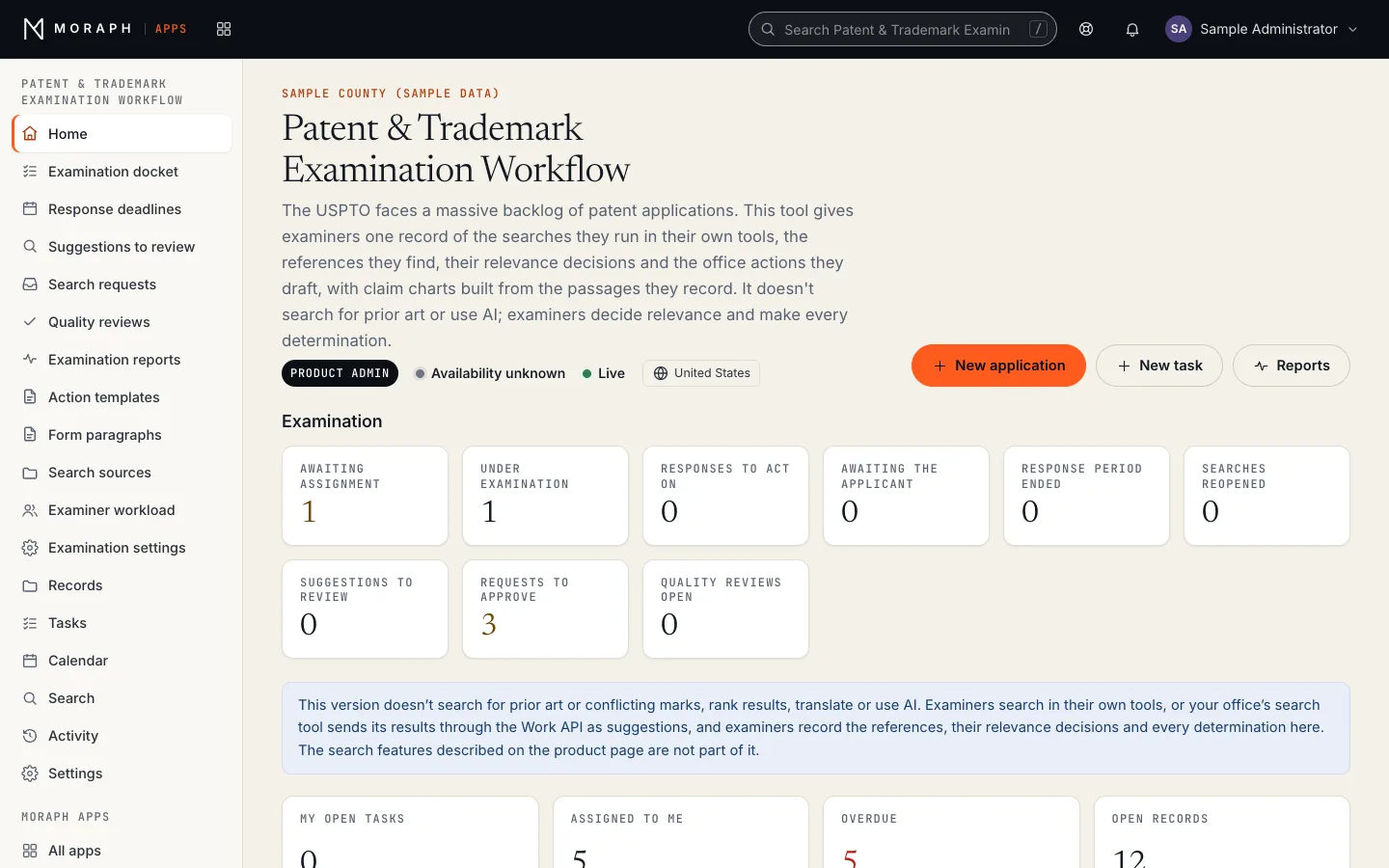
Patent & Trademark Examination Workflow in Moraph Apps: the product home for a sample organization, with the Examination panel; counts for awaiting assignment, under examination, responses to act on, awaiting the applicant; workflow stages (Applications: Awaiting assignment, Under examination, Awaiting response, Response received, Allowed, Finally rejected, Abandoned or withdrawn). All names and values are sample data.
Patent & Trademark Examination Workflow as it runs in the current build of Moraph Apps, with sample data (build dc8154a458, 2026-11-14). Records, names and figures are placeholders, not client data.
Notes on this screen (3)
  1. Product navigation This product’s own pages, then the records, tasks, calendar, search and activity every Moraph product shares.
  2. New application Creates a record in this product. A person fills it in; the product checks it against its rules before saving.
  3. Your work Open tasks, records assigned to you, overdue records and open records in this product, counted from its records.

Workflows

The principal workflows

  1. Understand the application

    The examiner records the claims and classification of a patent application, or the mark, goods and services and design codes of a trademark application, and lists the claim elements a search needs to cover.

    4 steps
    • Application created by staff, by CSV import or by your case system team through the Work API
    • Examiner lists the claim elements with labels such as 1a, or records the words and design codes of the mark
    • Classification and the art unit or law office recorded for the docket and reports
    • Examiner edits the breakdown at any time, and the claim chart follows it
  2. Search

    Examiners search the patent, literature and trademark sources your office makes available in their own tools and record each search here. Your office's search tool can also send its results through the Work API as suggestions.

    5 steps
    • Each search recorded with its source from the search sources register, its query and date
    • References from your search tool arrive through the Work API with the tool's rank, marked as suggestions
    • Documents in another language need their passages checked against the original or an official translation before they are relied on
    • Examiner records their own queries alongside any searches the tool sent
    • Every query, source and date recorded in the search history
  3. Review

    The examiner records each reference found, the claim elements it shows and the passages relied on, marks what is relevant and why, and sets aside the rest.

    5 steps
    • Passages recorded against each claim element label
    • Examiner marks documents as relevant, possibly relevant or not relevant
    • A claim chart builds from the passages the examiner accepts
    • For trademarks, each cited mark is compared by spelling, sound code, overlapping classes and shared design codes
    • Examiner notes recorded against each document or mark
  4. Record

    The claim chart and search history export as CSV files and the examination record prints on one page, beside the office action the examiner drafts here from your office's templates. The product issues nothing: actions are recorded as issued once your case system has issued them.

    4 steps
    • Claim chart and search history exported as CSV for your case system
    • Search history saved as the record of what was searched
    • Quality reviewers can see the search alongside the action that followed
    • Searches reopened if the applicant amends the claims

Roles and permissions

Who does what in the product

Your organization's administrators and technical leads give each person one of the roles below in the Moraph Portal under People and access. Each time someone's product access is given, changed or removed, it is recorded in the product's Activity.

Show each role and the permissions matrix

Viewer

People who need to see examination records without changing them, such as auditors and quality management

Sees the workspace without changing it.

Sees

  • Every application and the records against it, except unpublished applications unless they are its assigned examiner or on its examination team
  • The docket, deadlines, claim charts, search histories, templates, form paragraphs and reports

Does

  • Reads records and reports
  • Downloads the docket, claim charts, search histories and reports as CSV files

Cannot

  • Add, change or move records
  • Open an unpublished application, or anything recorded against it, unless they are its assigned examiner or on its examination team
  • Change templates, form paragraphs, the sources register or the examination settings
Approvals
None.
Notified about
Nothing by default.

User

Patent examiners, trademark examining attorneys, search specialists and quality reviewers

Does the day-to-day work: tasks, records and workflow steps.

Sees

  • Every application and the records against it, except unpublished applications unless they are its assigned examiner or on its examination team
  • Their own tasks and the rest of the team's

Does

  • Records applications, searches, cited references, office actions, interviews, search requests and quality reviews, and moves them through their stages
  • Imports records from a CSV file
  • Drafts office actions from templates and form paragraphs
  • Decides each suggested reference: relies on it or sets it aside
  • Marks an application Unpublished and keeps its examination team
  • Answers approved search requests assigned to them
  • Records quality reviews of other people's work

Cannot

  • Approve or decline a search request
  • Reassign an application once examination has started
  • Record as issued an action they drafted, once a product administrator turns on second-person sign-off (off by default)
  • Record, complete or cancel a quality review of their own work: the application's examiner and whoever drafted the action reviewed can't
  • Reopen a complete search record, a complete quality review or an interview made of record
  • Change templates, form paragraphs, the sources register or the examination settings
Approvals
Records an office action as issued only when someone else drafted it, once a product administrator turns on second-person sign-off in Examination settings (off by default). Records quality reviews only of work that isn't their own.
Notified about
When a record or task is assigned to them, and when work assigned to them is due or overdue, such as a response due, a response period ended, a search reopened after a claim amendment, a quality review's findings to read or a search request past its needed-by date.

Product administrator

Supervisory examiners and the program owner

Everything a User can do, plus the product's settings and reference data.

Sees

  • Every application and the records against it, including unpublished applications
  • Examination settings, templates, form paragraphs and the sources register
  • Recently deleted records

Does

  • Approves or declines supporting search requests and assigns the search specialist
  • Reassigns applications between examiners, also once examination has started
  • Keeps the action templates, form paragraphs and the search sources register
  • Sets response periods, reminder timings, examination rules and quality review sampling
  • Changes the workspace's record types, fields and workflow stages, manages Work API keys and restores deleted records

Cannot

  • Give people access to the product or change their roles: your organization's administrators and technical leads do that in the Moraph Portal under People and access
  • Approve or decline a search request they made
  • Record as issued an action they drafted when second-person sign-off is on, or review their own work
Approvals
Approves or declines supporting search requests, but not one they made. Like a User, records an action as issued only when someone else drafted it once second-person sign-off is on (off by default), and reviews only work that isn't their own.
Notified about
When a record or task is assigned to them, and when work assigned to them is due or overdue.

Permissions at a glance

ActionViewerUserProduct administrator
See applications and their records (unpublished ones: their examiner, examination team and product administrators only)FullFullFull
Download the docket, claim charts, search histories and reports as CSV filesFullFullFull
Add, change and move records through their stagesNo accessFullFull
Draft office actions and decide suggested referencesNo accessFullFull
Record an office action as issued (someone other than its drafter, when second-person sign-off is on; off by default)No accessApprovesApproves
Record or complete a quality review (not of your own work)No accessFullFull
Answer an approved search requestNo accessFullFull
Approve or decline a supporting search request (not one you made)No accessNo accessApproves
Reassign an application once examination has startedNo accessNo accessFull
Change templates, form paragraphs, the sources register and the examination settingsNo accessNo accessFull
Restore deleted recordsNo accessNo accessFull
Give people access and roles (in the Moraph Portal, by your organization's administrators and technical leads)No accessNo accessNo access
  • Full
  • Approves
  • No access

How access is controlled

  • Only people mark relevance: a search tool's key can't set it, rely on a reference or set one aside. Complete search records, issued actions and complete quality reviews are locked for everyone.
  • Unpublished applications, and every record that points at them, are visible only to their assigned examiner, the people on their examination team and product administrators; Work API keys never see them.
  • Examination rules are off until a product administrator turns them on in Examination settings, among them second-person sign-off before an action is recorded as issued, a recorded search before non-final and final actions, and a non-final action before a final one.
  • Nobody reviews their own work: the application's examiner and whoever drafted the action reviewed can't record, complete or cancel its quality review, and a product administrator can't approve or decline a search request they made.
  • Examination settings, action templates, form paragraphs and the sources register are changed only by product administrators, and every change is recorded in the activity.
  • Roles are given to each person by your organization's administrators and technical leads in the Moraph Portal under People and access.
  • Each time someone's product access is given, changed or removed, it is recorded in the product's Activity.

Features

What it does

Claim element breakdown

The examiner lists the claim elements, one per line with a label, so each one can be charted separately and the breakdown edited at any time.

Search tool suggestions

References your office's search tool sends through the Work API wait for the examiner's decision with the tool's rank, which never sets relevance.

Original-language check

A document in another language can be relied on only once the examiner records that its passages were checked against the original or an official translation.

Non-patent literature

Journal articles and other literature are recorded and charted the same way as patent documents, and reported separately by reference kind.

Passages by element

Each reference records the passages relied on against each claim element label, so the examiner's reasons stay with the evidence.

Claim charts

Passages the examiner relies on are assembled into a claim chart by element, which exports as CSV for the case system.

Mark comparison aids

Each cited mark is compared with the application's mark by spelling and sound code, with overlapping classes shown; these are aids, not similarity decisions.

Design codes

Design codes on the application and on cited marks are compared, and design code searches are recorded in the search history.

Complete search history

Every query, source, date and number of results reviewed is kept as the record of the search, and locked once complete.

Examiner-controlled relevance

Only people mark references as relevant; a search tool's rank is shown as a suggestion, and a Work API key can't set relevance.

Quality review view

Reviewers see the search history and selected references beside the action that followed, and record their findings.

Search and reference record

Each reference records how it was found (the examiner's search, a specialist, the applicant or your search tool) and the tool's rank beside the examiner's decision, and every search is kept in the search history.

Reporting

What you can report on

11 standard reports, grouped by who uses them. Each shows who it is for, how it can be broken down, how it is delivered and what it is used for. The data behind them is also available to your own reporting tools.

Show all 11 reports

Operational

Status by unit

For supervisory examiners

Applications in each unit by stage, including searches reopened after amendment.

Break down by
Art unit or law office, Examiner, Stage, Application type
Delivered as
Live dashboard; CSV export
Used for
Seeing where searches are waiting and balancing work across the unit.

Supporting search requests

For supervisors and search specialists

Requests for supporting searches, who made them, who is working them and their status.

Break down by
Requesting unit, Specialist, Status, Technology area
Delivered as
Live view
Used for
Managing specialist workload and response.

Search sources register

For search specialists and administrators

Each source in the register, when it was last updated, and whether a search of it is required.

Break down by
Source, Language, Update date, Status
Delivered as
Live view; currency-check tasks for administrators
Used for
Making sure examiners are searching current and complete sources.

Effectiveness

Suggestions accepted and rejected

For program owner, supervisors and quality staff

How often examiners marked references from your search tool relevant or set them aside, by the rank the tool gave.

Break down by
Technology area, Source, Rank band, Period
Delivered as
Live dashboard; CSV export
Used for
Judging how useful your search tool's suggestions are at each rank.

References cited by source

For program owner and leadership

References examiners cited, by source type, language and whether the tool or the examiner's own query found them.

Break down by
Source type, Language, Found by, Technology area
Delivered as
Live view; CSV export
Used for
Understanding which sources and search methods contribute to examination.

Days to first action

For program owner and supervisors

For each unit, applications with a first action, the average and longest days to it, and those still waiting.

Break down by
Technology area, Application, Still waiting
Delivered as
Live view; CSV export
Used for
Seeing where applications wait longest for a first action.

Quality

Quality review results

For quality reviewers and supervisors

Sampled searches, the reviewer's finding and how findings were resolved.

Break down by
Unit, Technology area, Finding type, Period
Delivered as
Live dashboard; CSV export
Used for
Targeting training and showing that searches are checked.

Reopened searches

For supervisors and quality staff

Applications whose claims were amended with no search recorded since, with the date of the last search.

Break down by
Unit, Technology area, Period
Delivered as
Live view; CSV export
Used for
Understanding how amendments affect search effort.

Governance and audit

Search and reference record

For program owner, oversight bodies and auditors

Every search recorded for an application (source, query, date, results reviewed, who ran it), and how each cited reference was found.

Break down by
Search kind, Application, Unit, Period
Delivered as
Live view; CSV export
Used for
Answering questions about where an examiner searched and when.

Settings change history

For program owner and auditors

Every change to examination settings, action templates and the sources register, with who made it and when, from the activity.

Break down by
Change type, Person, Change date
Delivered as
Live view; CSV export
Used for
Evidencing who changed the rules and when.

Audit trail extract

For auditors and inspector general staff

Who changed, decided, exported or opened the printable record of what, and when, for a period or person.

Break down by
Application, User, Action, Date range
Delivered as
Activity in the product; CSV export
Used for
Answering audit requests and confirming that confidential applications were accessed only by those assigned.
Exports, access and evidence
  • Every report can be exported to CSV, and the examination record of an application opens as one printable page.
  • Filters can be saved, so a supervisor or program owner keeps their own views by unit or technology area.
  • Search records, references and review outcomes are available through the Moraph Work API for your data warehouse or business intelligence tools.
  • Reports respect each viewer's role and the confidentiality of unpublished applications; aggregate reports do not reveal application content.
  • Complete search records, issued actions and complete reviews are locked, so what the reports count from them stays put. Running and exporting a report is itself recorded in the audit trail.

Integrations

How it connects to your systems

Patent & Trademark Examination Workflow: the requirements it supports and the systems it connects toRequirements it supportsConnects toPatent & TrademarkExamination…35 U.S.C. 102 (novelty) and 35 U.S.C. 103 (obviousness)35 U.S.C. 102 (novelty) and 35 U.S.C.103 (obviousness)35 U.S.C. 122 (confidential status of applications)35 U.S.C. 122 (confidential status ofapplications)Rules of practice in patent cases (37 CFR Part 1)Rules of practice in patent cases (37CFR Part 1)Manual of Patent Examining Procedure (MPEP)Manual of Patent Examining Procedure(MPEP)Trademark Act of 1946 (Lanham Act, 15 U.S.C. 1051 et seq.)Trademark Act of 1946 (Lanham Act, 15U.S.C. 1051 et seq.)Trademark Manual of Examining Procedure (TMEP)Trademark Manual of Examining Procedure(TMEP)Case management system: Applications, claims, classifications and assignments created by your case system team through the Work API or loaded by CSV import.Case management systemPatent document collections: The patent collections your examiners search are listed in the search sources register with when each was last updated; documents they cite are recorded as references.Patent document collectionsNon-patent literature sources: The literature databases your office licenses are listed in the search sources register; examiners search them in their own tools and record the articles they cite.Non-patent literature sourcesTrademark register: Registered and pending marks the examining attorney cites, with their classes and design codes, recorded from your trademark records or sent by your search tool through the Work API.Trademark registerSign-in: Staff sign in with their Moraph account, using email and password and, optionally, two-step verification. Sign-in through your own identity provider (SAML or OpenID Connect) is not offered.Sign-inWork API: Applications, references, search records and quality review results available to your data warehouse and reporting tools through the Moraph Work API, except unpublished applications.Work API

Requirements it supports

  • 35 U.S.C. 102 (novelty) and 35 U.S.C. 103 (obviousness)
  • 35 U.S.C. 122 (confidential status of applications)
  • Rules of practice in patent cases (37 CFR Part 1)
  • Manual of Patent Examining Procedure (MPEP)
  • Trademark Act of 1946 (Lanham Act, 15 U.S.C. 1051 et seq.)
  • Trademark Manual of Examining Procedure (TMEP)

Patent & Trademark Examination Workflow

Connects to

Each requirement links to its requirement page and each system to the integrations directory. Meeting a requirement remains your organization’s responsibility.
The diagram as a list

Requirements it supports

  • 35 U.S.C. 102 (novelty) and 35 U.S.C. 103 (obviousness)35 U.S.C. 102 (novelty) and 35 U.S.C. 103 (obviousness)
  • 35 U.S.C. 122 (confidential status of applications)35 U.S.C. 122 (confidential status of applications)
  • Rules of practice in patent cases (37 CFR Part 1)Rules of practice in patent cases (37 CFR Part 1)
  • Manual of Patent Examining Procedure (MPEP)Manual of Patent Examining Procedure (MPEP)
  • Trademark Act of 1946 (Lanham Act, 15 U.S.C. 1051 et seq.)Trademark Act of 1946 (Lanham Act, 15 U.S.C. 1051 et seq.)
  • Trademark Manual of Examining Procedure (TMEP)Trademark Manual of Examining Procedure (TMEP)

Connects to

  • Case management systemCase management system: Applications, claims, classifications and assignments created by your case system team through the Work API or loaded by CSV import.
  • Patent document collectionsPatent document collections: The patent collections your examiners search are listed in the search sources register with when each was last updated; documents they cite are recorded as references.
  • Non-patent literature sourcesNon-patent literature sources: The literature databases your office licenses are listed in the search sources register; examiners search them in their own tools and record the articles they cite.
  • Trademark registerTrademark register: Registered and pending marks the examining attorney cites, with their classes and design codes, recorded from your trademark records or sent by your search tool through the Work API.
  • Sign-inSign-in: Staff sign in with their Moraph account, using email and password and, optionally, two-step verification. Sign-in through your own identity provider (SAML or OpenID Connect) is not offered.
  • Work APIWork API: Applications, references, search records and quality review results available to your data warehouse and reporting tools through the Moraph Work API, except unpublished applications.
How each connection works (6)
Connects toHowWhat flows
Case management systemApplications, claims, classifications and assignments created by your case system team through the Work API or loaded by CSV import.In: application number, kind, claims, classification and assignee. Out: claim chart and search history CSV files, and records your team reads through the Work API.
Patent document collectionsThe patent collections your examiners search are listed in the search sources register with when each was last updated; documents they cite are recorded as references.In: document numbers, dates and citations, recorded by examiners or sent by your search tool through the Work API.
Non-patent literature sourcesThe literature databases your office licenses are listed in the search sources register; examiners search them in their own tools and record the articles they cite.In: citations, publication dates and passages relied on, recorded by examiners.
Trademark registerRegistered and pending marks the examining attorney cites, with their classes and design codes, recorded from your trademark records or sent by your search tool through the Work API.In: words, registration or serial number, classes and design codes of each cited mark.
Sign-inStaff sign in with their Moraph account, using email and password and, optionally, two-step verification. Sign-in through your own identity provider (SAML or OpenID Connect) is not offered.None: accounts are kept in Moraph
Work APIApplications, references, search records and quality review results available to your data warehouse and reporting tools through the Moraph Work API, except unpublished applications.Out: search records, cited references with how each was found, and review outcomes.

Each integration is confirmed in discovery and specified in the design. See how an engagement progresses.

Security and evidence

How your data is protected

Confidential applications

Unpublished application content is visible only to its assigned examiner, the people on its examination team and product administrators (supervisory examiners), supporting the confidentiality the law requires.

No AI models

The product doesn't use AI, so application content and examiner decisions are never used to train models.

United States hosting

Data is hosted on Cloudflare's network, in a database that is not restricted to a jurisdiction.

Encryption and keys

Client data is encrypted.

Complete audit trail

Every record change, relevance decision, export and opening of the printable examination record is logged with the person and time, and cannot be edited.

Tested releases

Every release passes security testing gates before it ships, and a software bill of materials is maintained for the product.

The evidence trail

What Patent & Trademark Examination Workflow records, and the reports that show it to a reviewer.

  1. Recorded

    Complete audit trail

    Every record change, relevance decision, export and opening of the printable examination record is logged with the person and time, and cannot be edited.

  2. Change record

    Settings change history

    Every change to examination settings, action templates and the sources register, with who made it and when, from the activity.

  3. Audit evidence

    Audit trail extract

    Who changed, decided, exported or opened the printable record of what, and when, for a period or person.

Request the evidence pack

Company-wide controls, data residency and subprocessors are described in our Trust Center, where you can request the evidence pack.

Deployment

Where and how it runs

Moraph cloud

Hosted and operated by Moraph on Cloudflare's network.

With a managed service

Optionally run alongside a Moraph managed service for administration, source updates and integration support.

Moraph Apps, and how the product is put together

Runs in Moraph Apps, the workspace shared by every Moraph-built product. Sign-in, roles, the audit trail, reports and the Work API are the same in every product; record types, fields, stages, roles and reports are configured for your organization during implementation, and anything beyond configuration is scoped as project work.

How a Moraph product is put together Your staff sign in once through the Moraph client portal and use the product in Moraph Apps, which runs on Cloudflare's global network and provides records, workflow, tasks, search, roles and the audit trail. The product's own services and your primary data run on Cloudflare too: the database is stored in one Cloudflare location and is not restricted to a jurisdiction. Your systems connect to the product through the Work API and the integrations agreed in the design. Your organization Your staffbrowser or mobile Your systemscore, EHR, cases Cloudflare global network Client portalsingle sign-on, two-step, roles Moraph Apps records, workflow stages, taskssearch, reports, rolesaudit trailWork API (/api/v1) Moraph data on Cloudflare Product servicesthe product’s own processingand integrations Primary dataone database, not restrictedto a jurisdiction
How every Moraph product is put together. Sign-in and the shared workspace run on Cloudflare’s global network; the product’s own services and your primary data run there too, in a database that is not restricted to a jurisdiction. Each integration is specified in the design.

Security controls and data residency are set out in our Trust Center. Engagement models and what drives a quotation are on Working with Moraph.

Implementation

What a rollout involves

Every implementation follows the same phases, described on Working with Moraph. Their length depends on scope, so the plan in your proposal gives the dates.

  1. Discovery
  2. Design
  3. Implementation
  4. Migration
  5. Testing
  6. Go-live
  7. Ongoing operations

For Patent & Trademark Examination Workflow, the work involves

  • Source onboarding

    We record the patent collections, literature sources and trademark records your examiners search in the search sources register, with those required for each application kind.

  • Case system integration

    We help your case system's team send applications and assignments through the Work API or a CSV import, and match the CSV exports to what the case system accepts. We need interface documentation and a contact from the system's owners.

  • Evaluation against past cases

    Examiners record a set of already-examined applications, with their searches and cited references, so your office can judge the claim charts, records and reports before go-live.

  • Roles and workflow

    Roles, art units or law offices, quality review sampling, examination rules and action templates are configured to match your procedures.

  • Governance documentation

    We document what the product does and doesn't do (it doesn't search, rank, translate or use AI), its examination rules and the human review steps, for your office's governance process.

  • Pilot and training

    A pilot group of examiners uses the tool in selected areas for a period you choose, and examiners, supervisors and reviewers are trained on their own workflows.

Who does what in each phase (7 phases)
PhaseMoraphYouAgreed outcome
DiscoveryWorkshops, a review of current processes and systems, and a written discovery summary with risks and assumptions.A sponsor, the people who do the work, existing documentation, and your security and compliance requirements.Signed-off scope, success measures and plan.
DesignSolution design, integration specifications, security and control mapping, and the test strategy.Decisions on design questions, and review by your architecture, security and compliance teams.An approved design. Later changes go through change control.
ImplementationConfiguration, integration build, environment setup, and regular demonstrations of progress.Access to the systems we integrate with, test accounts, and people available to review what is built.A build ready for testing.
MigrationThe migration approach, mapping, tooling, trial migrations and reconciliation reports.Extracts or access to source data, decisions about data quality and retention, and sign-off of reconciliations.A reconciled trial migration you have approved.
TestingSystem, integration, performance, security and accessibility testing, with defects fixed and retested.User acceptance testing by your own staff against the agreed success measures.Acceptance, recorded in writing, with any open issues and their owners listed.
Go-liveThe cut-over plan and rehearsal, final migration, go-live support, and close watch on the system immediately afterwards.A go or no-go decision against agreed readiness criteria, trained users, and communication to your organization.Production use, with a period of close support before handover.
Ongoing operationsRunbooks, handover to support (and to operations under a managed service), service reporting, and planning for updates and renewals.Named administrators and contacts, and a regular service review with us.Service measured against the levels in your agreement.

From Working with Moraph. Responsibilities between us are written into the plan in your proposal.

Release notes

Version 1.7

Patent & Trademark Examination Workflow

Generally available
Generally available since
8 October 2022
Last updated
13 April 2026, version 1.7
End of support
None announced. At least 12 months’ notice before any end of support.

Version history

  1. 1.7

    • Maintenance release: security updates, dependency upgrades and fixes.
  2. 1.6

    • Added: Quality review view.
Earlier releases (6)
  1. 1.5

    • Added: Examiner-controlled relevance.
  2. 1.4

    • Added: Complete search history.
  3. 1.3

    • Added: Mark comparison aids.
  4. 1.2

    • Added: Claim charts.
  5. 1.1

    • Added: Passages by element.
  6. 1.0

    • General availability.
    • Included at launch: Design codes, Search and reference record, Claim element breakdown, Search tool suggestions, Original-language check, Non-patent literature.

What the stages mean, how versions work and our end-of-support policy: Product lifecycle.

Limitations

What it does not do

Worth knowing before you evaluate it.

  • It does not decide patentability or registrability. Examiners decide what is relevant and make every determination, and the office's procedures apply.
  • It doesn't search for prior art or conflicting marks. Examiners search in their own tools, or your office's search tool sends its results through the Work API.
  • It doesn't connect to any patent, literature or trademark database; the search sources register records what examiners search and when each source was last updated.
  • It doesn't translate. A document in another language is relied on only once the examiner records that its passages were checked against the original or an official translation.
  • It doesn't issue office actions or send anything to applicants; actions drafted from templates are recorded as issued once your case system has issued them.
  • Moraph holds no FedRAMP authorization for this product. We provide control documentation to support your office's own authorization decision.
  • It is not designed for classified information, including applications under secrecy orders, which must be handled outside it.
  • It doesn't rank results or decide whether marks are similar; the spelling and sound codes are aids, and a search tool's rank is shown only as a suggestion.

Evaluation checklist

What to test in a demonstration or pilot

Questions worth putting to us, and to any other vendor you are considering.

  1. Record a few already-examined applications with their searches and cited references, and compare the claim charts with the actions issued
  2. Ask examiners from different technology areas to work an application and note where the record helped or got in the way
  3. Check that a document in another language can't be relied on until its passages are marked as checked
  4. Test the sound-code comparison on cited marks that differ in spelling but sound alike
  5. Review the exported search history and claim chart against what your quality reviewers need
  6. Confirm that unpublished applications are visible only to the people assigned to them

Questions

Frequently asked questions

Does the tool decide whether a claim is patentable or a mark can be registered?

No. It doesn't search, rank or decide anything: examiners record the references and marks they find, decide what is relevant and make every determination under your office's procedures.

Can examiners still run their own searches?

Yes. Examiners search in their own tools and record each keyword, classification or other query here, in the same search history as any searches your search tool sends through the Work API.

Where does application content go?

It stays in the product; only your own team takes it out, through exports or the Work API. The product doesn't use AI and never trains models on it.

Which databases does it search?

None. Examiners search the patent collections, literature sources and trademark records your office licenses in their own tools; the search sources register lists them, which are required and when each was last updated.

Is it FedRAMP authorized?

No. Moraph holds no FedRAMP authorization for this product. We provide control documentation to support your office's own authorization decision.

How do we judge whether it helps?

Start with a pilot unit: examiners record searches, references and actions on live applications, and supervisors check the claim charts, search histories and reports against what they need.